Backup encryption at rest
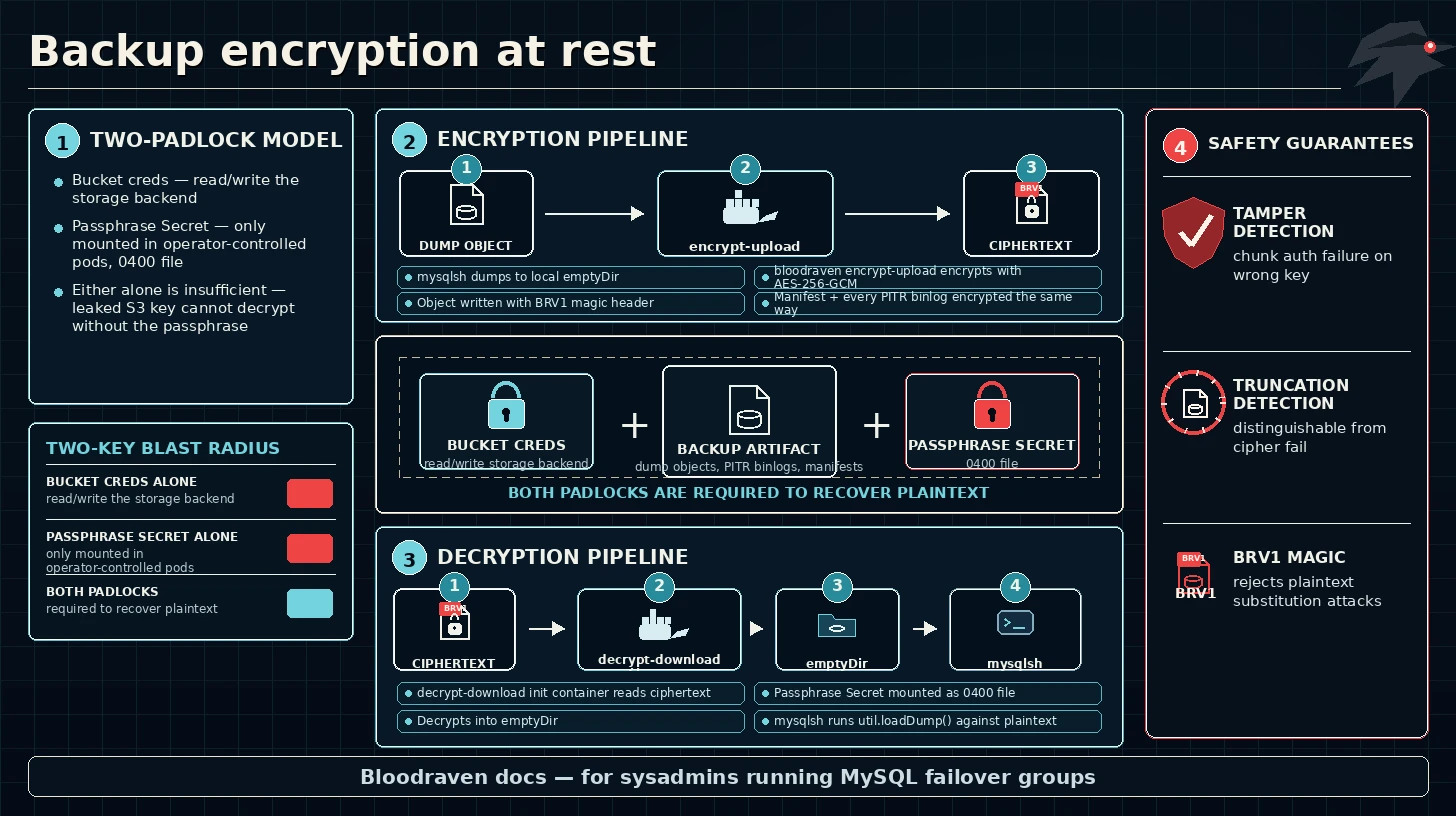
Bloodraven can encrypt every backup artifact — full dump objects written by backup Jobs, archived binlog files uploaded by the sidecar, and their accompanying manifests — using a per-profile passphrase Secret. Encryption is opt-in, enabled by a single new field on a backup profile:
spec:
  backup:
    profiles:
      - name: nightly-s3
        storage:
          type: S3
          s3:
            bucket: shipstream-backups
            prefix: orders
            region: us-east-1
            credentialsSecret: s3-backup-creds
        encryption:
          algorithm: AES-256-GCM        # default; reserved for future algos
          passphraseSecret:
            name: orders-backup-passphrase
            key: passphrase             # defaults to "passphrase"
Operators who prefer storage-layer protection (AWS SSE-KMS, LUKS on
PVCs, bucket default encryption) can leave the encryption: block
unset and rely on that. For compliance-sensitive workloads — or any
setup where the operator team wants to own the keys end-to-end
— turn on client-side encryption.
Why client-side envelope encryption
Bucket default SSE-KMS already encrypts objects at rest in AWS, but the data-encryption keys live in the AWS account that hosts the backups. With client-side envelope encryption:
- The passphrase never leaves the Kubernetes control plane. Reads
happen inside the operator-controlled pods (backup Job, restore
Job, sidecar archiver, verification Job,
pitr-downloadinit container), which mount the Secret as a 0400 file — not an env var. - The bucket / PVC credentials are divorced from the key material. A leaked S3 access key grants access to encrypted objects only; an attacker still needs the passphrase to recover plaintext.
- The
mysqlshimage never handles encryption. Dumps are staged in a local emptyDir by the mysqlsh init container and then encrypted and uploaded by a separatebloodraven encrypt-uploadmain container; on restore the mirrorbloodraven decrypt-downloadinit container decrypts into the emptyDir before mysqlsh runsutil.loadDump(). Every encryption / decryption step runs in a container that carries the operator-authoredbloodravenbinary, so MySQL-tooling CVEs can't exfiltrate plaintext if the mysqlsh container is subsequently compromised.
Wire format
Every encrypted object is a self-describing byte stream in the BRV1 format:
Header (32 bytes):
  [0..3]   magic          "BRV1"
  [4]      version        0x01
  [5]      algorithm      0x01  (AES-256-GCM)
  [6..7]   chunk_log2     uint16 BE. Plaintext chunk = 1 << chunk_log2.
  [8..23]  salt           16 bytes random. Fed to HKDF-SHA256.
  [24..31] nonce_prefix   first 8 bytes of each 12-byte GCM nonce.

Body: repeated chunks of AES-256-GCM(ciphertext || tag). Nonce layout:
  nonce[0..7]   = nonce_prefix
  nonce[8..10]  = counter (24-bit big-endian, starts at 0)
  nonce[11]     = final_flag (0x00 except on the last chunk: 0x01)
- Key derivation.
dk = HKDF-SHA256(secret=passphrase, salt, info="bloodraven-backup-encryption-v1", len=32). A fresh random salt per file means two encryptions of the same plaintext do not share a data-encryption key. - Tamper detection. AES-GCM authenticates every chunk; the final chunk carries a distinct AAD byte so a truncated stream is rejected rather than silently decoded as a shorter plaintext. A post-final trailer of extra bytes is also rejected.
- File size ceiling. 2^24 chunks × 64 KiB default chunk
size = 1 TiB per file. MySQL dump objects almost never hit this
(a consistent dump is split across thousands of smaller chunk
files by mysqlsh), and single sealed binlog files are capped by
MySQL's
max_binlog_sizewhich users tune to hundreds of MiB. If you ever need bigger single files, raisechunk_log2in a future release.
Object names (S3 keys, PVC filenames) remain plaintext — the format
doesn't try to hide them. Manifest files (manifest-<site>.json) are
wrapped in the same BRV1 envelope so per-site GTID ranges and file
lists do not leak either.
The format is implemented by internal/backupcrypto. The package
test suite covers round-trip, wrong-passphrase rejection, truncation
detection, empty plaintext, and a 4-MiB random payload torture test.
Wiring it up
1. Create the passphrase Secret
Bloodraven does not generate the passphrase itself — this keeps the Secret's lifecycle and backup policy firmly in the operator's hands. Use a long (≥32 bytes) random string:
head -c 48 /dev/urandom | base64 > passphrase.txt
kubectl create secret generic orders-backup-passphrase \
  --namespace orders \
  --from-file=passphrase=passphrase.txt
shred -u passphrase.txt
:::warning Treat the Secret as critical recovery material The passphrase is the only way to read an encrypted backup. If the Secret is deleted or the value is rotated without re-encrypting the existing artifacts, those artifacts become unrecoverable. Back the Secret up out of band (e.g. 1Password, AWS Secrets Manager, sealed Secrets) with an audit trail; never rely solely on the live Kubernetes Secret. :::
2. Reference it from the profile
Add encryption to the backup profile in the MysqlFailoverGroup spec,
as shown at the top of this page. That single field enables:
- Client-side encryption of every full dump produced by Jobs from this profile.
- Client-side encryption of every sealed binlog the sidecar archiver
uploads under this profile's storage (when
spec.backup.pitrpoints at the same profile). - Decryption on the matching restore, in-place restore, and
verification paths — the operator stamps
MysqlBackup.status.encrypted: trueand the restore builder automatically pulls the same passphrase from the profile.
3. Apply; the operator validates
On apply the operator checks that the referenced Secret exists and
carries the configured key (defaulting to passphrase). A
misconfiguration emits a warning event:
Warning  BackupEncryptionInvalid
  profile "nightly-s3": encryption.passphraseSecret Secret "orders-backup-passphrase"
  not found in namespace "orders"
Subsequent backups still attempt to run — Kubernetes surfaces the
missing-Secret error on the Job pod itself — but the event makes
the root cause visible in kubectl describe mysqlfailovergroup.
Observing encryption
On each MysqlBackup CR:
kubectl get mysqlbackup orders-nightly-20260423 -o jsonpath='{.status}' | jq .
{
  "phase": "Succeeded",
  "location": "s3://shipstream-backups/orders/orders-nightly-20260423/",
  "sizeBytes": 18874368,
  "encrypted": true,
  "encryptionAlgorithm": "AES-256-GCM",
  ...
}
In Job logs the bloodraven encrypt-upload main container emits
a BLOODRAVEN_DUMP_COMPLETE sentinel identical in shape to the
unencrypted flow, plus encrypted=true and
algorithm=AES-256-GCM:
BLOODRAVEN_DUMP_COMPLETE location=s3://... sizeBytes=18874368 size=18.0_MiB \
  gtidExecuted=abc:1-100 binlogFile=mysql-bin.000042 binlogPos=118 \
  ciphertextBytes=19006 files=42 encrypted=true algorithm=AES-256-GCM
The operator log-tail parser rehydrates the encrypted and
algorithm tokens into .status so dashboards can filter on them.
Object-level verification — fetch the first 32 bytes of any artifact:
aws s3 cp --range bytes=0-31 s3://shipstream-backups/orders/orders-nightly-20260423/@.json head
xxd head | head -1
# 00000000: 4252 5631 0101 0010 ... -- "BRV1" magic + version + algorithm
Restore paths
Encryption is transparent to the restore caller: when the source
backup's .status.encrypted is true the operator automatically
adds a decrypt-download init container to the restore Job. The
mysqlsh main container reads plaintext from a shared emptyDir and
runs util.loadDump() as before.
The restore Job picks the passphrase Secret in this order:
spec.initFromBackup.decryption.passphraseSecretif set (recommended for cross-group restores).- Otherwise, the profile's own
encryption.passphraseSecreton the target MysqlFailoverGroup — which is the natural choice when restoring into the same group that took the backup.
If neither is available, the restore fails fast with a
RestoreBuildFailed event:
Warning  RestoreBuildFailed
  initFromBackup.source.mysqlBackupRef="orders-preupgrade" is encrypted but
  no passphrase is available; set initFromBackup.decryption.passphraseSecret
  or restore the profile's encryption.passphraseSecret
spec.restoreInPlace.decryption follows the exact same contract.
Verification
MysqlBackupVerification automatically decrypts through the same
bloodraven decrypt-download init container. Verification does not
have its own decryption field by design: "verify what this profile
produced" is exactly the scope where the profile's passphrase is
authoritative. If you remove the encryption block from the profile
between the backup and the verification, the verification fails with
a clear error event:
Warning  VerificationBuildFailed
  backup "orders-nightly-20260423" is encrypted but profile "nightly-s3"
  has no encryption.passphraseSecret; restore the encryption field to
  verify this backup
PITR binlog archival
When spec.backup.pitr.profileName references a profile with
encryption set, the sidecar archiver transparently wraps every
Put / PutFile call through the same BRV1 format. The operator
mounts the passphrase Secret onto the sidecar container and sets
BLOODRAVEN_PITR_PASSPHRASE_FILE; sidecar.NewArchiveStore wraps
the concrete S3/PVC backend in an encryptedStore when that env
var is present.
On the restore side, the pitr-download init container mounts the
same passphrase and passes it into its own NewArchiveStore call so
downloaded binlogs land in the emptyDir decrypted and ready for
mysqlbinlog | mysql replay. Per-site manifests are encrypted too
— the archiver reads and writes them through the wrapped store
like any other object.
Rotation
There is no in-place re-encryption today. To rotate the passphrase:
- Create a new Secret with the new passphrase value.
- Update the profile's
encryption.passphraseSecret.nameto point at the new Secret. - Future backups encrypt under the new key; existing backups stay encrypted under the old key.
- When every backup that was encrypted under the old passphrase has aged out of retention, delete the old Secret.
Rotate the restore-side spec.initFromBackup.decryption /
spec.restoreInPlace.decryption references the same way during the
transition window.
:::tip Keep the old Secret until retention clears
Deleting the old Secret too early will make the still-retained
older backups unrecoverable. The minKeep floor on
retentionPolicy protects against a storm of failed backups after
a passphrase mistake; rotation has no equivalent safety net.
:::
Plaintext passthrough on upgrade
A cluster that already had backups and then enabled encryption mid-life will have a mix of plaintext and encrypted objects in the same prefix. Both restore and verification paths handle this: the decrypt code detects the missing BRV1 magic and copies the bytes through unchanged. Over time retention will age out the plaintext objects, but you do not need to re-upload or hand-encrypt them.
The same behavior covers PITR binlogs that were archived under a plaintext profile before encryption was turned on.
Threat model boundaries
In scope:
- Confidentiality of backup dump contents and archived binlog data against anyone who can read S3 objects / PVC files but does not hold the passphrase Secret.
- Tamper detection via AES-GCM: modified ciphertext fails to decrypt, so a corrupted or attacker-modified object cannot be silently loaded.
- Truncation detection via the final-flag nonce byte.
Out of scope:
- Object-name confidentiality (S3 keys and PVC filenames are plaintext by design).
- Backup size leakage within one chunk of granularity (64 KiB by default).
- Protection of the MysqlBackup CR's metadata —
.status.location, size, GTID coordinates are plaintext on the Kubernetes API. - Attacks that compromise the operator's ServiceAccount or the passphrase Secret directly. Those are covered by the broader Kubernetes threat model, not by backup encryption.
Compatibility matrix
| Component | Pre-encryption | Encrypted |
|---|---|---|
spec.backup.profiles[] | unchanged | adds encryption: |
| Backup Job shape | single-container mysqlsh | init-container mysqlsh + main-container bloodraven encrypt-upload |
| Restore Job shape | single-container mysqlsh | adds decrypt-download init container + /restore-decrypted emptyDir |
| Verification Job shape | single-container mysqlsh | adds decrypt-download init container |
| Sidecar archiver upload path | direct Put/PutFile | wrapped in encryptedStore |
bloodraven pitr-download | raw GetFile | wrapped in encryptedStore |
MysqlBackup.status | no change | adds encrypted, encryptionAlgorithm |
.status.size, .sizeBytes, GTID | unchanged | reports plaintext byte count, not ciphertext |
The wire format carries its own magic bytes, so restore / verify paths can always tell encrypted and plaintext apart without out-of- band metadata — a cluster can safely mix the two during an upgrade.