Backup and restore
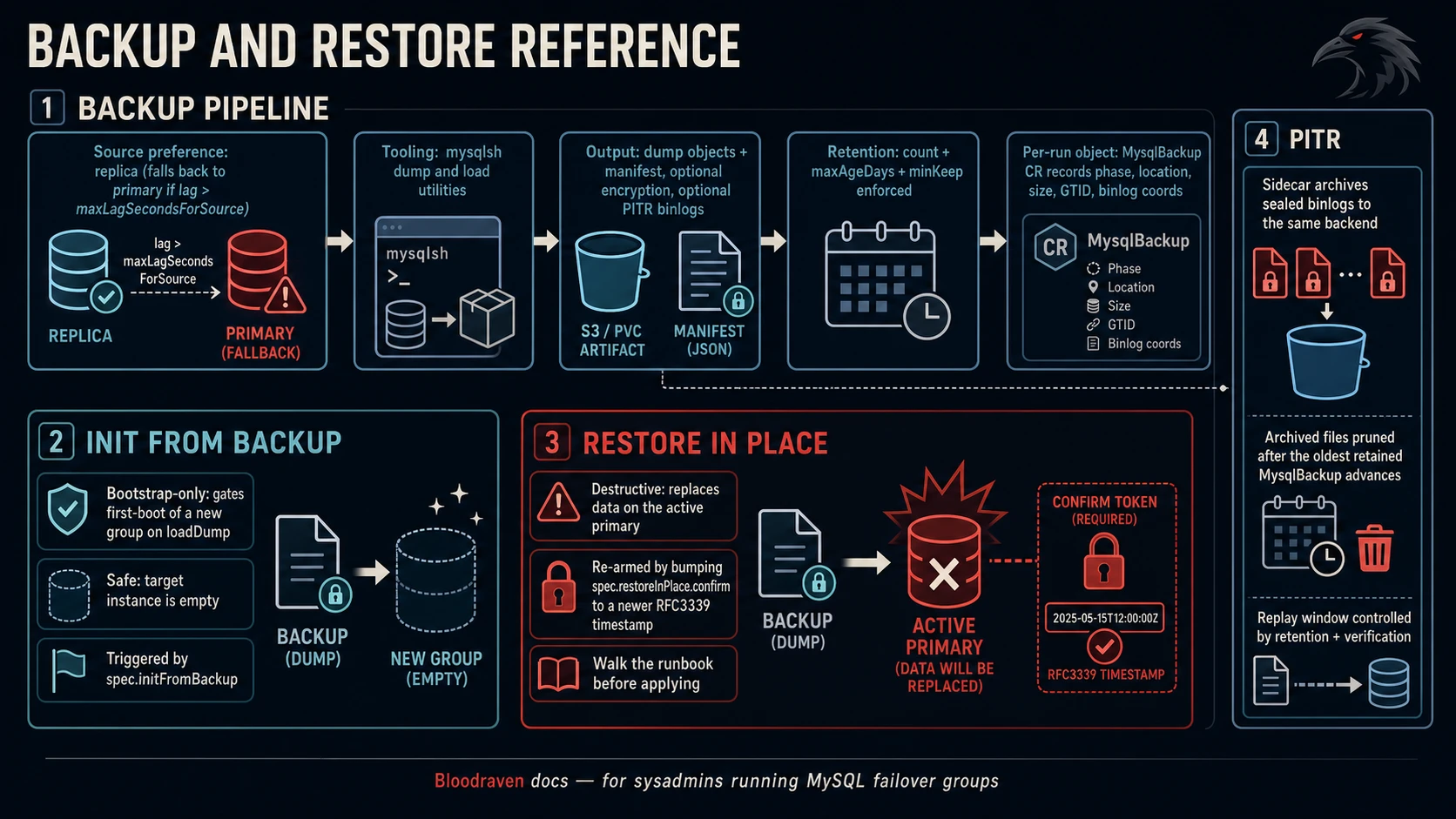
Bloodraven drives scheduled and on-demand MySQL backups using the
mysqlsh util.dumpInstance() / util.loadDump() utilities against a
configurable S3 or PVC destination. Restores are bootstrap-only in v1:
populate a brand-new MysqlFailoverGroup from a previous dump before
cross-site replication starts.
:::tip Quick setup guides Use S3 Backups or PVC Backups for copy-paste setup. This page is the deep behavior reference for source selection, retention, verification, PITR, restore semantics, and failure modes. :::
Backup decision table
| Need | Use |
|---|---|
| Durable off-cluster recovery | S3 profile |
| Local lab or short-lived staging copy | PVC profile |
| Lower RPO than full backup cadence | PITR binlog archival |
| Proof that backups load | MysqlBackupVerification |
| Compliance-grade application-level encryption | spec.backup.profiles[].encryption |
Restore workflow checklist
- Confirm whether this is a new recovery group or a destructive in-place restore.
- Confirm source artifact, namespace, bucket/PVC path, and decryption Secret.
- Disable production traffic to the recovery DNS name until validation completes.
- Verify MySQL starts, expected schemas exist, and application smoke tests pass.
- Only then move traffic or update application configuration.
Recovery time and sizing considerations
Restore time depends on dump size, compression, object-store or PVC throughput, loadOptions.threads, MySQL startup time, and any PITR replay window. Size staging volumes and verification PVCs for at least the compressed artifact plus restore working space; production teams should measure this with a full-size backup before go-live.
Concepts
- Backup profile — a named, reusable configuration living on
MysqlFailoverGroup.spec.backup.profiles[]. Selects a storage target (S3 or PVC), dump options, and retention. - Backup schedule — a cron expression on
MysqlFailoverGroup.spec.backup.schedules[]that references a profile by name. Each schedule becomes a KubernetesCronJobowned by the operator. MysqlBackupCRD — one CR per backup run. Created ad-hoc viakubectl createor by the schedule CronJob. Tracks phase, start / completion times, dump location, size, GTID, and binlog coordinates.- Restore —
spec.initFromBackupon the failover group. Gates initial bootstrap on a one-shotutil.loadDump()into a dynamically- selected target site. - Verification — a parallel
MysqlBackupVerificationCRD andspec.backup.profiles[].verificationblock that periodically restores the latest Succeeded backup into a throwaway MySQL instance to prove it's actually loadable. See Backup verification. - Encryption at rest — opt-in, per-profile
spec.backup.profiles[].encryptionblock that turns on client-side envelope encryption (AES-256-GCM) for every dump artifact and archived PITR binlog. The passphrase lives in a Kubernetes Secret the operator controls, so keys and storage credentials can be kept on separate blast radii. See Backup encryption.
The backup image
The default image is pinned to
container-registry.oracle.com/mysql/community-server:9.7. This
bundles the mysqlsh binary; the community-shell repository that
appears in some docs does not exist in the Oracle registry — a
common stumbling block. Production deployments should always pin this
explicitly via spec.backup.image and avoid floating tags like :9
or :latest, since mysqlsh dump/load compatibility across versions
is not guaranteed.
Backup source selection
The reconciler prefers the replica site as the dump source so the
primary is not loaded by long-running backups. It falls back to the
primary when the replica is unreachable, not replicating, or lagging
beyond spec.backup.maxLagSecondsForSource (default 300). Override
per-backup with spec.sourceSiteOverride on a MysqlBackup CR.
When ActiveSite changes while a backup is in flight, the backup
reconciler emits an InFlightFailover warning event on the CR. This
is a soft signal: the artifact is still a valid point-in-time snapshot
of the original source, but operators should know a failover happened
mid-dump so they can correlate it with any replication-gap alerts.
Security context defaults
Every backup, restore, and cleanup Job pod runs with a hardened pod-
and container-level SecurityContext matching the Restricted Pod
Security Standard:
| Level | Field | Default |
|---|---|---|
| pod | runAsNonRoot | true |
| pod | runAsUser / runAsGroup | 27 (mysql) |
| pod | fsGroup | 27 |
| pod | seccompProfile.type | RuntimeDefault |
| container | allowPrivilegeEscalation | false |
| container | readOnlyRootFilesystem | true |
| container | runAsNonRoot | true |
| container | capabilities.drop | [ALL] |
| container | seccompProfile.type | RuntimeDefault |
Because readOnlyRootFilesystem=true, the backup Job pod also mounts
two ephemeral emptyDir volumes: mysqlsh-home at /home/mysqlsh
(mysqlsh needs a writable home for ~/.mysqlsh) and tmp at /tmp.
HOME is set to /home/mysqlsh so mysqlsh discovers them cleanly.
Users can override individual fields via spec.backup.podSecurityContext
and spec.backup.containerSecurityContext. Overrides are merged on
top of the defaults — any unset field stays at the default, and any
set field wins. This lets you tighten further (e.g. set a specific
seLinuxOptions) without reintroducing capabilities or root access.
Credential layout
MySQL credentials are never injected into the backup pod via envFrom.
Instead the reconciler derives a Secret per backup run (with
MYSQL_USER / MYSQL_PASSWORD keys) and mounts it as files at
/run/bloodraven/mysql-creds/ with mode 0400. The embedded Python
dump script reads the files via the BLOODRAVEN_MYSQL_CREDS_DIR env
var. This keeps plaintext passwords out of /proc/$PID/environ on
the pod and makes accidental env-var leaks (e.g. in panic stack
traces) much less dangerous.
In credentials mode (spec.credentials), the derived Secret reads
username/password directly from spec.credentials.backupSecret
(or falls back to operatorSecret if no dedicated backup secret is
configured). In legacy mode (spec.secretName), the credentials
are parsed from the DSN in the referenced Secret.
For S3 profiles the same pattern applies to AWS credentials: the
profile's credentialsSecret is mounted at
/run/bloodraven/aws-creds/ (mode 0400), pointed at by
BLOODRAVEN_AWS_CREDS_DIR, and the dump script assembles a standard
~/.aws/credentials file on the fly so the AWS SDK inside mysqlsh
picks it up natively.
S3 backup profile
apiVersion: shipstream.io/v1alpha1
kind: MysqlFailoverGroup
metadata:
  name: orders
  namespace: orders
spec:
  image: mysql:9.7
  secretName: mysql-credentials
  # ... sites, dns, sidecar omitted ...
  backup:
    image: container-registry.oracle.com/mysql/community-server:9.7
    maxLagSecondsForSource: 120
    retry:
      maxAttempts: 3
      initialBackoffSeconds: 60
      maxBackoffSeconds: 1800
    profiles:
      - name: nightly-s3
        retentionPolicy:
          count: 14
          maxAgeDays: 30
          minKeep: 1
          maxFailedKeep: 10
        storage:
          type: S3
          s3:
            bucket: shipstream-backups
            prefix: orders
            region: us-east-1
            credentialsSecret: s3-backup-creds
        dump:
          threads: 8
          bytesPerChunk: "128M"
          compression: zstd
          consistent: true
    schedules:
      - name: nightly
        profileName: nightly-s3
        schedule: "0 2 * * *"
        timeZone: "America/Los_Angeles"
The referenced s3-backup-creds Secret must contain
AWS_ACCESS_KEY_ID, AWS_SECRET_ACCESS_KEY, and optionally
AWS_SESSION_TOKEN / AWS_REGION. The keys are each mounted as a
separate file under /run/bloodraven/aws-creds/ and the dump script
stitches them into a standard credentials file at startup.
TimeZone
schedules[].timeZone is an IANA zone name (default Etc/UTC) that
is passed to the CronJob spec's .timeZone field. This matters
because kube-controller-manager's local timezone is environment-
dependent and unreliable — two clusters running the same manifest
can fire the same cron at different wall-clock times. Pinning the
TZ per-schedule makes backup scheduling reproducible no matter where
the control plane runs.
MinIO or other S3-compatible stores
Set storage.s3.endpointURL to the target endpoint (e.g.
https://minio.internal:9000). The reconciler maps this onto
mysqlsh's s3EndpointOverride option.
PVC-backed profile
backup:
  profiles:
    - name: daily-local
      retention: 7
      storage:
        type: PVC
        pvc:
          storageClassName: fast
          size: 50Gi
      dump:
        compression: zstd
If pvc.claimName is empty the operator provisions a PVC named
mysql-<fg>-backup-<profile>. Otherwise the user-managed claim is
mounted read-write into the backup Job at /backups.
Structured retention
Each profile can use the structured retentionPolicy field instead
of the shorthand retention: N int:
| Field | Meaning | Default |
|---|---|---|
count | Max successful CRs to keep. 0 disables count-based pruning. | 0 |
maxAgeDays | Max age of a successful CR before it's eligible for pruning. | 0 |
minKeep | Safety floor — this many newest successful CRs are always kept. | 1 |
maxFailedKeep | Max Failed CRs to keep per profile. | 10 |
A successful CR is kept if any of the enabled checks say "keep":
inside the count window, inside the maxAgeDays window, or within
the minKeep floor. minKeep is the critical safety knob: if every
recent attempt after a long outage has failed, it prevents a retention
sweep on the next successful run from wiping the last good backup.
The legacy shorthand retention: 7 is still supported and maps to
(count=7, minKeep=1, maxFailedKeep=10).
Artifact cleanup
When a MysqlBackup CR is deleted (manually or by retention) the
reconciler runs a short-lived cleanup Job via the
shipstream.io/mysqlbackup finalizer. The cleanup Job uses the same
mysqlsh image and credentials layout as the backup Job, but runs
cleanup.py instead of dump.py. It dispatches on the
BLOODRAVEN_STORAGE_TYPE env var:
- S3 — invokes
util.rmdump(prefix, {s3BucketName: ...})to recursively delete the dump prefix. "Not found" / "no such key" responses are treated as success. - PVC — resolves the dump subdirectory under the mount and
rmtrees it. Refuses to delete anything outside the mount root.
Events:
ArtifactCleanupStarted— cleanup Job created.ArtifactCleanupSucceeded— artifact removed or already gone.ArtifactCleanupFailed— cleanup Job failed. The finalizer blocks the CR deletion until either the next attempt succeeds or an operator force-deletes by removing theshipstream.io/mysqlbackupfinalizer by hand.ArtifactCleanupSkipped— the referenced failover group or profile is gone, so cleanup cannot run.
Retries for scheduled backups
spec.backup.retry configures operator-level retries for scheduled
CRs that land in Failed. This is independent of the Job-level
backoffLimit: Job backoff retries the container inside a single CR,
whereas this retries the whole CR and produces a fresh MysqlBackup
object with its own Job and attempt counter.
backup:
  retry:
    maxAttempts: 3         # total attempts including the original
    initialBackoffSeconds: 60
    maxBackoffSeconds: 1800
Backoff is exponential: the Nth retry waits
initialBackoffSeconds * 2^(N-1) seconds from the failed CR's
completion time, capped at maxBackoffSeconds. spec.backup.retry
is ignored for ad-hoc CRs — those are operator-initiated and do not
participate in automatic retries.
One-off backups
apiVersion: shipstream.io/v1alpha1
kind: MysqlBackup
metadata:
  name: orders-preupgrade
  namespace: orders
spec:
  failoverGroupRef:
    name: orders
  profileName: nightly-s3
  triggeredBy: manual
Inspect with kubectl get mysqlbackups. The Phase, Location, and
Size columns reflect the current state. Failed runs leave a
condition on .status.conditions explaining the reason.
Restore at bootstrap
To recover a lost failover group from a previous backup, create a
new MysqlFailoverGroup that references an existing
MysqlBackup CR in the same namespace:
apiVersion: shipstream.io/v1alpha1
kind: MysqlFailoverGroup
metadata:
  name: orders
  namespace: orders
spec:
  image: mysql:9.7
  secretName: mysql-credentials
  # ... sites etc. ...
  backup:
    profiles:
      - name: nightly-s3
        storage:
          type: S3
          s3:
            bucket: shipstream-backups
            prefix: orders
            credentialsSecret: s3-backup-creds
  initFromBackup:
    source:
      mysqlBackupRef:
        name: orders-preupgrade
Dynamic target-site resolution
The restore reconciler does not hard-code spec.sites[0] as the
restore target. Instead it resolves dynamically via
restoreTargetSite:
- If
status.activeSiteis set and that site is observed writable (or has no observed state yet on fresh deploys), use it. - If
status.activeSiteis set but that site is observed in any other state (read-only, unreachable), refuse — the reconciler emits aRestoreTargetUnavailablewarning event and parks the restore inPending. This prevents accidentally overwriting a recovering standby with a stale dump. - Otherwise (true fresh deploy) fall back to
spec.sites[0].Name.
Rolled-out Deployment gate
Before spawning the load Job, the reconciler waits until the target site's Deployment is fully rolled out:
generation <= 1→ accept as long asReadyReplicas >= 1(fresh deploy;ObservedGenerationmay briefly lag).- Otherwise, require
ObservedGeneration >= Generation,UpdatedReplicas >= 1, andReadyReplicas >= 1.
This guards against firing a load against a Deployment mid-rolling- update, which would race the ready MySQL container against the terminating one.
Direct S3 / PVC sources
initFromBackup.source also accepts a direct S3 URL or a read-only
PVC, which is useful when the source backup CR has been garbage-
collected:
initFromBackup:
  source:
    s3:
      bucket: shipstream-backups
      prefix: orders/orders-preupgrade
      credentialsSecret: s3-backup-creds
Restores are one-shot. If the Job fails, inspect the logs, delete the
Job, and the reconciler will rebuild it on the next pass. Restoring
into a non-empty data directory is not supported — util.loadDump()
fails fast with a clear error.
Per-schema bootstrap (tenant migration pattern)
loadOptions.includeSchemas and loadOptions.excludeSchemas are
forwarded to util.loadDump() and let you carve a subset of a
full-instance dump into a brand-new failover group. This is useful for
migrating a single tenant off a shared cluster onto its own dedicated
one:
spec:
  initFromBackup:
    source:
      mysqlBackupRef:
        name: shared-nightly
    loadOptions:
      includeSchemas: ["tenant_42"]
Operationally, the migration pattern is: put the tenant into
application-level maintenance mode, take a backup of the shared
cluster, deploy a new MysqlFailoverGroup with includeSchemas
pointing at the tenant's schema, then flip the app's connection string
to the new group. System users are not part of a util.dumpInstance
dump, so pair the restore with whatever user-provisioning process the
new group uses.
In-place restore (spec.restoreInPlace)
initFromBackup is one-shot and runs before the failover group is
considered ready. For rolling an existing, live cluster back to a
previous dump (or replaying to a point-in-time) without teardown or
rename, use spec.restoreInPlace. It is re-triggerable and operates
directly against the active primary.
Two modes are supported, selected by loadOptions.includeSchemas:
Full-instance in-place restore
When includeSchemas is empty, the restore wipes every user schema on
the primary and reloads from the dump. Choreography:
- Preflight — validates that
status.activeSiteis writable and theconfirmtimestamp is newer than the last consumed one. - Fencing — the operator strips the
primaryrole label on the active pod(s), so the-primaryService sheds endpoints and apps see connection errors. The topology manager is frozen: no promotion, auto-clone, or recovery actions fire during the restore. - Restoring — a Job runs
util.loadDump()after aSTOP REPLICA; RESET REPLICA ALL; DROP DATABASE <each-user-schema>preflight.skipBinlog=trueon the load (the replica is about to be re-cloned, so there is no point burning binlog space). Optional PITR replay runs after the dump load, against the same primary. - Resuming — the primary role label is restored, the
topology manager is unfrozen, and the
reclone-siteannotation is set for the peer. The existing reclone machinery then CLONEs the peer from the freshly-restored primary in the background.
spec:
  restoreInPlace:
    confirm: "2026-04-17T14:32:00Z"
    source:
      mysqlBackupRef:
        name: orders-nightly-20260416
    pointInTime:
      stopDatetime: "2026-04-17T14:30:00Z"
Per-schema in-place restore
When includeSchemas contains exactly one entry, the restore drops and
reloads only that schema. The primary Service stays up — other
tenants keep writing — and replication carries the DROP + load
through the primary's binlog to the peer. No reclone is scheduled.
spec:
  restoreInPlace:
    confirm: "2026-04-17T14:32:00Z"
    source:
      mysqlBackupRef:
        name: shared-nightly
    loadOptions:
      includeSchemas: ["tenant_42"]
The caller is responsible for putting the affected tenant into
application-level maintenance mode. The operator forces
skipBinlog=false on the load so the propagation to the peer works.
:::warning Per-schema PITR has a caveat
PITR binlog replay on a per-schema restore adds
mysqlbinlog --database=<schema> to the pipeline. That filter matches
on the session's default database at log time, not on the schemas
a statement actually touches. For well-isolated multi-tenant schemas
this is fine. For apps that issue cross-schema statements
(INSERT INTO a.t SELECT ... FROM b.t) use a full-instance restore
instead — the filter can silently drop or misapply events.
:::
The confirm timestamp
spec.restoreInPlace.confirm must be an RFC 3339 timestamp (e.g.
2026-04-17T14:32:00Z). It is the anti-fat-finger gate: the operator
refuses to run the restore unless confirm parses and is strictly
greater than status.restoreInPlace.confirmTokenUsed. On every new
run, bump confirm to a newer timestamp. A common idiom in automation
is to set confirm: $(date -u +%FT%TZ) at the moment the user
authorizes the restore.
This gives programmatic callers a simple "just send now()" pattern while also protecting against replay: an older manifest applied accidentally does not re-trigger a restore.
Changing confirm while a restore Job is already running does not
interrupt it. The running Job may be mid-DROP or mid-load against the
live primary, so the operator lets it finish and records its outcome
against the confirm it was accepted under (visible as
status.restoreInPlace.confirmTokenUsed); the new confirm then starts
its own run once the first reaches a terminal phase. Until then the CR
says so:
status.restoreInPlace.message: in-flight restore Job mysql-orders-pdx-inplace-restore
  is running under confirm=2026-04-17T14:32:00Z; confirm=2026-04-17T15:05:00Z
  starts a new run once it finishes
Observing the state machine
kubectl get mysqlfailovergroup orders -o jsonpath='{.status.restoreInPlace}' | jq .
Phase sequence:
Preflight → Fencing → Restoring → Resuming
→ Succeeded (or Failed at any point). Failed is terminal;
inspect the Job logs, fix the underlying issue, then bump confirm to
re-arm.
Required MySQL privileges
Consistent dumps (dump.consistent: true, the default) need
BACKUP_ADMIN on the backup user in addition to standard replication
and dump grants:
GRANT RELOAD, LOCK TABLES, PROCESS, REPLICATION CLIENT,
      SELECT, SHOW VIEW, EVENT, TRIGGER, BACKUP_ADMIN
      ON *.* TO 'backup'@'%';
Without BACKUP_ADMIN, set dump.consistent: false on the profile.
local_infile and the restore user
Loading a dump uses LOAD DATA LOCAL INFILE, which the server rejects
unless @@GLOBAL.local_infile is ON. MySQL 8 ships it OFF, so the
restore Job turns it on for the duration of the load and puts the prior
value back afterwards — the hardened posture outside the load window is
unchanged. That requires SYSTEM_VARIABLES_ADMIN on the restore user:
GRANT SYSTEM_VARIABLES_ADMIN ON *.* TO 'restore'@'%';
This is checked before anything destructive runs. If local_infile
is OFF and the operator cannot enable it, the Job exits with
BLOODRAVEN_LOCAL_INFILE_UNAVAILABLE and no schema is dropped — the
load could not have succeeded, so the restore fails with the data still
intact rather than dropping the target and then failing to reload it.
(A server already running local_infile=ON needs no extra grant.)
Point-in-time recovery (PITR)
Bloodraven can continuously archive MySQL binary logs so restores can
target an arbitrary --stop-datetime on top of any retained full
dump, not just the dump's own capture point. For the interaction
between PITR and emergency-failover RPO — specifically, when PITR
does and does not narrow the data-loss window — see
Durability and RPO → PITR and the RPO window.
How it works
Binlog archival runs inside the existing sidecar on every MySQL pod. The archiver goroutine:
- Uses inotify on
mysql-bin.indexin the data PVC to detect rotations. A poll-tick everyarchivePollInterval(default 60s) is a belt-and-suspenders safety net in case an inotify event is missed. - Gates on
@@read_only— only the primary uploads. After a failover the new primary takes over within one scan cycle; GTID dedup at restore time makes any brief overlap harmless. - For each newly sealed binlog file, extracts timestamp + GTID metadata, uploads the file to the referenced backup profile's storage, and appends an entry to a per-site manifest.
Storage layout under the profile's prefix:
<profile-prefix>/binlogs/
├── manifest-<site-a>.json
├── manifest-<site-b>.json    # post-failover (or different primary)
├── <site-a>/mysql-bin.000042
├── <site-a>/mysql-bin.000043
└── <site-b>/mysql-bin.000001
Per-site manifests prevent races between the current primary and a post-failover primary writing to the same object. The restore side reads every manifest in the prefix and merges their entries.
Enabling PITR
Set spec.backup.pitr on the failover group and point it at an
existing backup profile:
spec:
  backup:
    profiles:
    - name: primary
      storage:
        type: S3
        s3:
          bucket: lion-backups
          prefix: prod
          region: us-east-1
          credentialsSecret: aws-creds
      retentionPolicy:
        count: 14
        minKeep: 3
    pitr:
      enabled: true
      profileName: primary
      maxBinlogSize: "100M"     # MySQL max_binlog_size; controls
                                # rotation cadence and therefore RPO
When enabled, the operator:
- Injects
max_binlog_size=<value>into the generatedmy.cnf(default100M). Smaller values shorten the RPO gap (unarchived tail on a crashed primary) at the cost of more objects. - Mounts the MySQL data PVC read-only into the sidecar container so the archiver can read sealed binlog files.
- Mounts the profile's storage credentials (for S3) or the backup PVC (for PVC) into the sidecar.
- Rolls the MySQL pods to pick up the new config (the spec hash includes effective PITR values, with defaults normalized, so changing the default in a future release also rolls pods).
Retention
Archived binlogs are pruned to track full-backup retention: once the
oldest retained MysqlBackup for a profile moves forward, binlogs
with lastEventTime before that cutoff are no longer needed and
get deleted.
The mechanism is pull-driven: the sidecar archiver polls the
operator's auxiliary HTTP server at
/pitr-cutoff?namespace=X&group=Y&profile=Z (default once per hour),
which returns the minimum CompletionTime across retained backups.
The archiver then prunes its own manifest and deletes the
corresponding objects. The operator pod doesn't need storage
credentials — the archiver already has them.
Restore to a target timestamp
Add a pointInTime block to spec.initFromBackup:
spec:
  initFromBackup:
    source:
      mysqlBackupRef:
        name: nightly-2026-04-14
    pointInTime:
      stopDatetime: "2026-04-15T09:30:00Z"
      # excludeGtids: "server-uuid:42"   # optional, skip a bad txn
stopDatetime accepts RFC 3339 (with or without trailing Z or
timezone offset) or MySQL's native YYYY-MM-DD HH:MM:SS form.
The restore Job runs in two phases, one per container:
pitr-downloadinit container (bloodraven pitr-downloadsubcommand) — downloads every archived binlog whosefirstEventTime ≤ stopDatetimefrom the PITR archive storage into a sharedemptyDir(/pitr-binlogs/<site>/...). Uses the AWS SDK v2 for S3 (with paginator), so it doesn't depend on theawsCLI existing in the MySQL image.mysqlshmain container — runs the existingutil.loadDump()as before, then feeds the downloaded binlogs throughmysqlbinlog --stop-datetime=<target> | mysql --binary-mode. Server-side GTID dedup skips transactions already applied by the dump load.
Observability
- Archiver status:
GET /archiver/statuson the sidecar (mysql-<fg>-<site>:8080) returns{enabled, primary, lastScanAt, filesArchived, lastError, storageType, manifestPrefix, site}— handy forkubectl execpoking or a Prometheus scraper. - Job logs:
BLOODRAVEN_PITR_START,BLOODRAVEN_PITR_COMPLETE/BLOODRAVEN_PITR_FAILED/BLOODRAVEN_PITR_NOOPfrom the restore container; one JSON line per archived file from the init container.
Known limitations
- A GTID-set-based file filter would let the restore download fewer
binlogs; today it filters on
firstEventTimeonly and relies on GTID dedup to cover over-inclusion.
Metrics
The operator emits five Prometheus metrics for backups. All are
labelled by {group, profile} unless noted.
| Metric | Type | Labels | What it measures |
|---|---|---|---|
bloodraven_backup_runs_total | counter | group, profile, result | Terminal backups labelled success or failure. |
bloodraven_backup_duration_seconds | histogram | group, profile | Wall-clock duration from Job StartTime to CompletionTime. |
bloodraven_backup_last_success_timestamp_seconds | gauge | group, profile | Unix timestamp of the most recent successful backup. |
bloodraven_backup_last_attempt_timestamp_seconds | gauge | group, profile | Unix timestamp of the most recent terminal attempt, any result. |
bloodraven_backup_last_size_bytes | gauge | group, profile | Size in bytes of the last successful backup artifact. |
All five are emitted exactly once per terminal reconcile, via a semantic-equality check on the computed next status plus a stable completion timestamp derived from the Job's terminal condition. This means re-reconciling an already-terminal CR does not produce duplicate counter increments or churny gauge updates.
Typical alerts:
- Stale backup:
time() - bloodraven_backup_last_success_timestamp_seconds > 86400 - Repeated failures:
increase(bloodraven_backup_runs_total{result="failure"}[24h]) > 3 - Runaway duration:
histogram_quantile(0.95, rate(bloodraven_backup_duration_seconds_bucket[1h])) > 3600
Monitoring
kubectl get mysqlbackups -A— phase, location, size.kubectl describe mysqlfailovergroup <name>— rollup understatus.backupSchedules[](includinglastSuccessfulBackupName,lastRetryAttempt,nextRetryTime) andstatus.lastBackupTime.kubectl logs job/mysqlbackup-<name>— live dump progress, plus the finalBLOODRAVEN_DUMP_COMPLETEsentinel line with the structuredlocation,sizeBytes,gtidExecuted,binlogFile,binlogPosfields.- Prometheus metrics above.
- Events on the
MysqlBackupCR:BackupStarted,BackupSucceeded,BackupFailed,InFlightFailover,ArtifactCleanup*. - Events on the
MysqlFailoverGroupCR:BackupRetryScheduled,BackupPITRNotImplemented,RestoreTargetUnavailable.