Configuration Overview
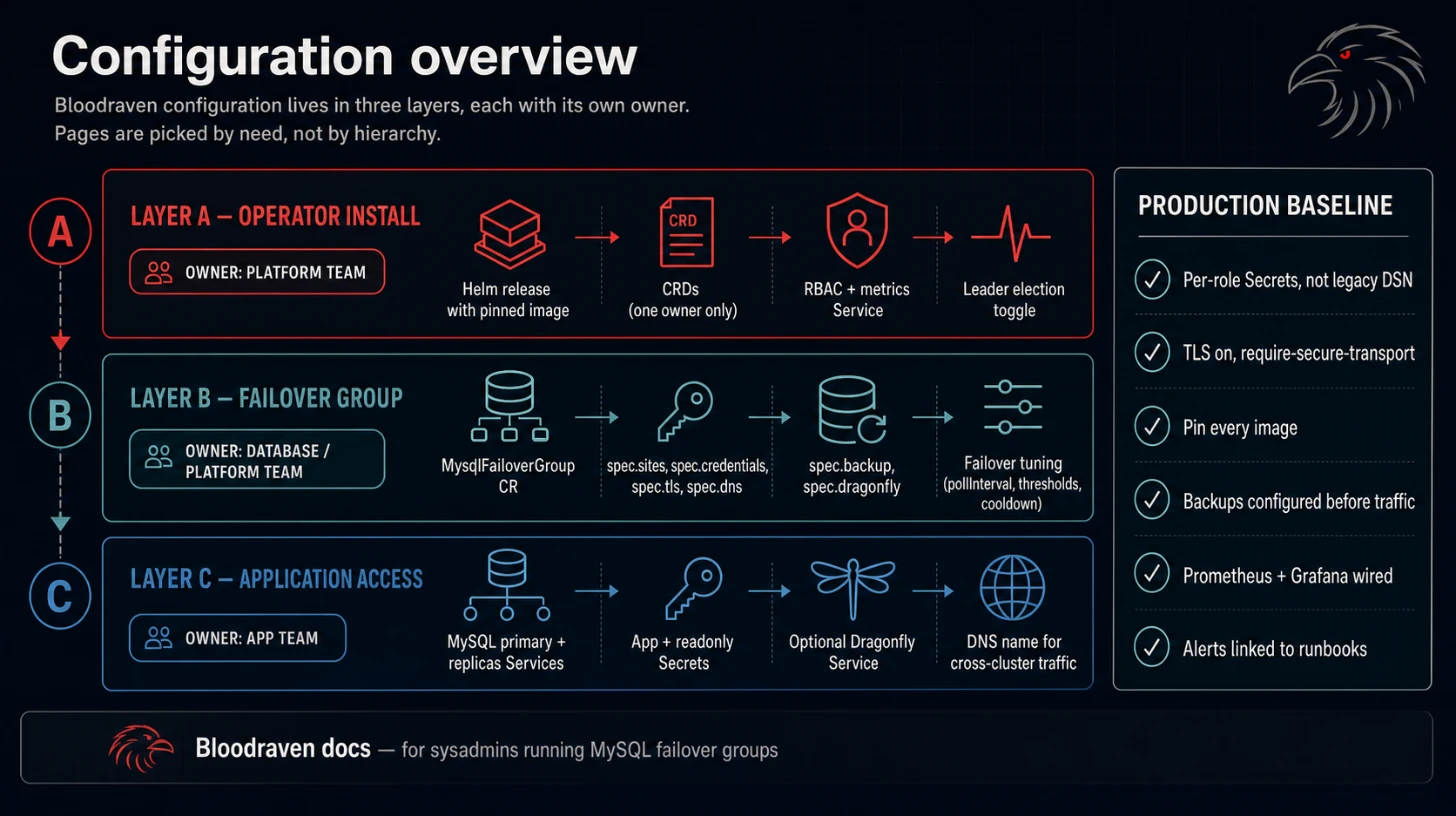
Use this section when you already know what Bloodraven does and need to choose the right configuration surface.
Pick the right page
| Need | Start here |
|---|---|
| Smallest working manifest | Getting Started |
| Production installation path | Production Install |
| Every CRD field and default | CRD Reference |
| Per-role users and MySQL TLS | Credentials and TLS |
| Node labels, zones, and taints | Placement Contract |
| Application connection behavior | App Integration |
| Security boundaries and network surfaces | Security Model |
| Go-live requirements | Production Hardening |
Configuration model
Bloodraven has three layers:
| Layer | Resource | Owner |
|---|---|---|
| Operator install | Helm release, CRDs, RBAC, metrics Service | Platform team |
| Failover group | MysqlFailoverGroup | Database/platform team |
| Application access | MySQL Services, optional Dragonfly Service, Secrets, DNS name | Application team with platform guardrails |
MySQL configuration precedence
Bloodraven renders a separate deterministic MySQL ConfigMap for every site. The effective option order is:
- Bloodraven built-in defaults.
- Normalized
spec.mysqlConfgroup overrides. - Normalized
spec.sites[].mysqlConfoverrides for that site. - Bloodraven-owned replication safety settings, reasserted last.
Option names normalize _ to - before every merge. For example,
max_connections and max-connections address the same effective key; do
not define both spellings in one map and expect two settings. A site spelling
overrides the equivalent normalized group key. Final keys are sorted, so
semantically equivalent maps render and hash identically.
The operator always owns gtid-mode, enforce-gtid-consistency, log-bin,
log-replica-updates, skip-replica-start, and clone plugin loading. User
values cannot weaken these replication invariants.
Each Deployment mounts mysql-<group>-<site>-config. A rendered-config hash,
not the raw maps, drives drift: changing or deleting a site override rolls
that site while leaving unaffected sites alone. Ordered updates restart every
drifted non-active follower sequentially after checking read-only state,
direct source, and replication threads. If the active site also drifted, a
healthy promotable standby takes over before the old active is restarted. A
reader-only or other non-active-only change never causes failover, and neither
readers nor dr-only sites are chosen as handoff targets.
Upgrades from the legacy group ConfigMap are level-driven. Bloodraven creates all per-site maps first, rolls live Deployment references one site at a time, and deletes the legacy map only after every Deployment references its expected site map. Reconciliation can resume safely after an operator restart at any point in this migration.
Service inheritance and isolation
spec.serviceTemplate defaults the client-facing site Services and the
-primary and -replicas Services. A site's
spec.sites[].serviceTemplate overrides only that site's client Service:
- Non-zero site
type,externalTrafficPolicy, andnodePortvalues override inherited values. - Group and site annotations merge, with site keys winning. Site annotations
never leak to siblings,
-primary,-replicas, or internal Services. externalTrafficPolicyis legal only when the effective Service type isNodePortorLoadBalancer. The group value also applies to primary and replicas Services when their type supports it.nodePortis site-only, legal only forNodePortorLoadBalancer, and applies only to the named MySQL port. Kubernetes admission enforces the cluster's configured allocation range.
Omitting a site NodePort preserves its compatible allocated MySQL NodePort
while the Service remains external. Switching between NodePort and
LoadBalancer preserves that compatible allocation; switching to ClusterIP
clears external-only fields. Bloodraven preserves Kubernetes-assigned Service
identity and annotations it does not own.
For every site, Bloodraven also creates
mysql-<group>-<site>-internal. It is always ClusterIP, ignores all user
Service templates, publishes not-ready addresses, and exposes MySQL plus the
sidecar for operator, replication, clone, backup, and peer traffic. The
client-facing Service exposes MySQL only. When Go clients dial the internal
Service with spec.tls, Bloodraven retains the client-facing site hostname as
the TLS ServerName, so existing certificates do not need another DNS name.
Operators that enable strict hostname verification inside MySQL-native clone
or replication must account for the internal Service hostname separately.
Recommended production baseline
- Use
spec.credentialsinstead of legacyspec.secretName. - Use distinct Secrets for operator, app, read-only, monitor, and backup users.
- Set
spec.tlsand require client TLS in application connection strings. - Pin operator, sidecar, MySQL, and backup images.
- If you enable
spec.dragonfly, pinspec.dragonfly.imageto Dragonflyv1.38.0+and route applications to the Bloodraven-created active Dragonfly Service. - Configure backups before production traffic starts.
- Enable Prometheus scraping, Grafana dashboards, and alerts.
- Link alerts to Runbooks.
Resource defaults
Bloodraven now sets a default resources.requests on every container it creates,
so the operator's workloads can be scheduled on clusters that enforce a
ResourceQuota or a LimitRange requiring requests. Where the user already
has a CR override field, that field continues to win; only previously-unset
containers picked up a default.
| Workload | Container | Resource source |
|---|---|---|
| MySQL Deployment (per site) | mysql | spec.sites[].resources (user-supplied) |
| MySQL Deployment (per site) | sidecar | spec.sidecarResources (user-supplied) |
| Dragonfly StatefulSet | dragonfly | spec.dragonfly.resources (user-supplied) |
| Backup Job | mysqlsh / mysqlsh-dump / backup-encrypt-upload | spec.backup.resources |
| Cleanup Job | mysqlsh | spec.backup.resources |
| Verification Job | mysqlsh | spec.verification.resources |
| Verification Job init | decrypt-download | spec.backup.resources when set, else 100m CPU / 128Mi memory (requests only) |
| Restore Job (bootstrap + in-place) | mysqlsh | spec.backup.resources when set, else 100m CPU / 128Mi memory (requests only) |
| Restore Job init | pitr-download, decrypt-download | spec.backup.resources when set, else 100m CPU / 128Mi memory (requests only) |
| Operator (Helm) | operator | .Values.resources in charts/bloodraven/values.yaml |
The 100m/128Mi init-container default matches the operator's own request
in the Helm chart. It is intentionally conservative: the AES-GCM decrypt
stream and the PITR archive walker tolerate small requests when the
container can burst on the host. Override by setting spec.backup.resources
on the failover group; the same value flows to the init containers.
The cleanup Job reuses spec.backup.resources because it runs the same
cleanup.py payload sized by the same backup profile parameters. If a
future workload needs a separate budget, we add a dedicated field then.
Security context defaults
Two new opt-in fields let cluster operators apply Kubernetes Restricted PSS to the MySQL Deployments and Dragonfly StatefulSets without forcing a uid/gid migration on existing clusters:
spec.podSecurityContextandspec.containerSecurityContext— applied to the MySQL Deployment pod and to itsmysqlandsidecarcontainers.spec.dragonfly.podSecurityContextandspec.dragonfly.containerSecurityContext— applied to the Dragonfly StatefulSet.
When these fields are nil (the default), Bloodraven leaves the workload's PodSpec untouched; existing CRs render identical pods to before. When they are set, the operator applies the value verbatim — it does not merge with internal hardened defaults. The user owns the uid, gid, fsGroup, seccomp profile, and capability set, because the right values depend on which MySQL and Dragonfly images you run.
See Production Hardening → Opt-in Restricted PSS for MySQL and Dragonfly
for worked examples and the upgrade procedure for existing clusters whose
/var/lib/mysql PVCs were created without an fsGroup.