Credentials And TLS
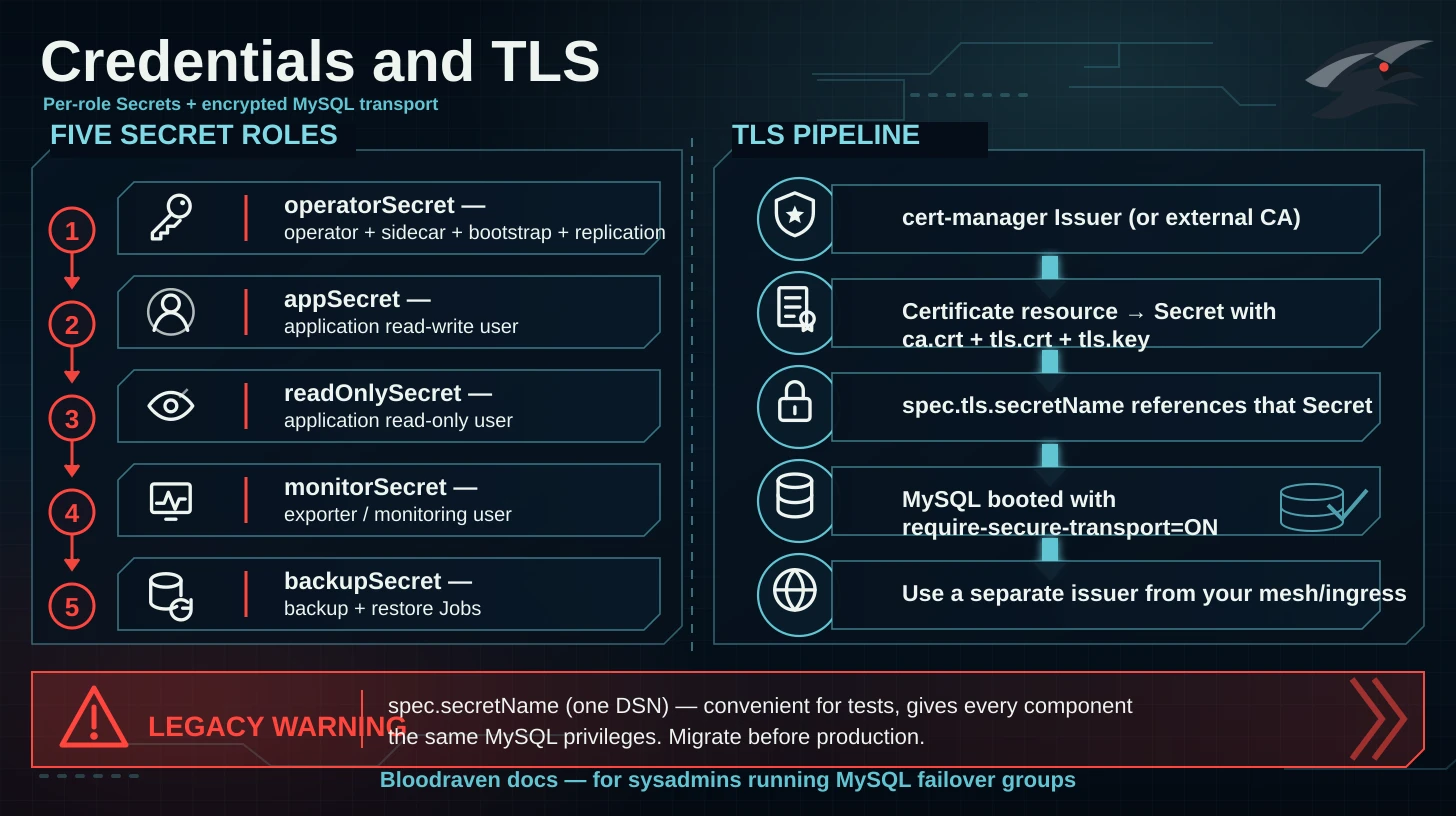
Bloodraven supports two credential models. Use per-role credentials for new deployments.
:::warning Legacy DSN model
spec.secretName points at a single Secret containing a dsn key. It is convenient for tests but gives every component the same MySQL privileges. Do not use it for new production failover groups. Migrate by creating the role Secrets below, setting spec.credentials, and removing spec.secretName in the same apply.
:::
Credential roles
| Field | Required keys | Purpose |
|---|---|---|
operatorSecret | username, password, MYSQL_ROOT_PASSWORD; optional MYSQL_REPLICATION_USER, MYSQL_REPLICATION_PASSWORD | Operator, sidecar, bootstrap, replication |
appSecret | username, password | Application read-write user |
readOnlySecret | username, password | Application read-only user |
monitorSecret | username, password | Exporter and monitoring user |
backupSecret | username, password | Backup and restore Jobs |
Create Secrets
kubectl create namespace orders

kubectl create secret generic orders-mysql-operator -n orders \
  --from-literal=username=bloodraven \
  --from-literal=password='replace-with-random-operator-password' \
  --from-literal=MYSQL_ROOT_PASSWORD='replace-with-random-root-password' \
  --from-literal=MYSQL_REPLICATION_USER=replicator \
  --from-literal=MYSQL_REPLICATION_PASSWORD='replace-with-random-replication-password'

kubectl create secret generic orders-mysql-app -n orders \
  --from-literal=username=orders_app \
  --from-literal=password='replace-with-random-app-password'

kubectl create secret generic orders-mysql-readonly -n orders \
  --from-literal=username=orders_readonly \
  --from-literal=password='replace-with-random-readonly-password'

kubectl create secret generic orders-mysql-monitor -n orders \
  --from-literal=username=orders_monitor \
  --from-literal=password='replace-with-random-monitor-password'

kubectl create secret generic orders-mysql-backup -n orders \
  --from-literal=username=orders_backup \
  --from-literal=password='replace-with-random-backup-password'
cert-manager TLS Secret
spec.tls.secretName must reference a Secret with ca.crt, tls.crt, and tls.key. With cert-manager, create a Certificate in the same namespace as the failover group:
apiVersion: cert-manager.io/v1
kind: Certificate
metadata:
  name: orders-mysql-tls
  namespace: orders
spec:
  secretName: orders-mysql-tls
  duration: 2160h
  renewBefore: 360h
  issuerRef:
    name: mysql-ca
    kind: ClusterIssuer
  commonName: orders.az.example.com
  dnsNames:
    - orders.az.example.com
    - mysql-orders-primary.orders.svc.cluster.local
    - mysql-orders-replicas.orders.svc.cluster.local
    - mysql-orders-iad.orders.svc.cluster.local
    - mysql-orders-pdx.orders.svc.cluster.local
The operator uses verified TLS for credentials-mode MySQL connections when spec.tls.secretName is set. Include ca.crt in the Secret and make sure the certificate covers the primary Service plus every per-site Service (mysql-<group>-<site>.<namespace>.svc.cluster.local) so failover probes, promotion, bootstrap/reclone, and credential reconciliation can validate the server identity.
Manual TLS Secret
kubectl create secret generic orders-mysql-tls -n orders \
  --from-file=ca.crt=./ca.crt \
  --from-file=tls.crt=./tls.crt \
  --from-file=tls.key=./tls.key
Failover group example
apiVersion: shipstream.io/v1alpha1
kind: MysqlFailoverGroup
metadata:
  name: orders
  namespace: orders
spec:
  image: mysql:9.7
  sidecarImage: ghcr.io/shipstream/bloodraven-sidecar:0.1.6
  credentials:
    operatorSecret: orders-mysql-operator
    appSecret: orders-mysql-app
    readOnlySecret: orders-mysql-readonly
    monitorSecret: orders-mysql-monitor
    backupSecret: orders-mysql-backup
  tls:
    issuerRef:
      name: mysql-ca
      kind: ClusterIssuer
    secretName: orders-mysql-tls
  dns:
    hostname: orders.az.example.com
    ttl: 60
  sites:
    - name: iad
      zone: us-east-1a
      taintNodeSelector:
        shipstream.io/failover-group.orders: "true"
        shipstream.io/site.orders: iad
      lbIP: 10.0.1.1
      storage:
        storageClassName: fast-ssd
        size: 100Gi
    - name: pdx
      zone: us-west-2a
      taintNodeSelector:
        shipstream.io/failover-group.orders: "true"
        shipstream.io/site.orders: pdx
      lbIP: 10.0.2.1
      storage:
        storageClassName: fast-ssd
        size: 100Gi
Client connection examples
mysql --host=orders.az.example.com \
  --user=orders_app \
  --password \
  --ssl-mode=VERIFY_IDENTITY \
  --ssl-ca=/etc/mysql/ca.crt
JDBC:
jdbc:mysql://orders.az.example.com:3306/orders?sslMode=VERIFY_IDENTITY&serverSslCert=/etc/mysql/ca.crt
Go go-sql-driver/mysql should register a TLS config with the CA and use tls=<name> in the DSN. See App Integration for application reconnect guidance.
Rotation expectations
- Updating a referenced Secret is the supported rotation path.
- Rotate one role at a time and watch operator Events.
- Keep old app credentials valid until application pods have restarted or connection pools have reconnected.
- Treat the TLS private key and backup encryption passphrases as recovery material.