GitOps guidance
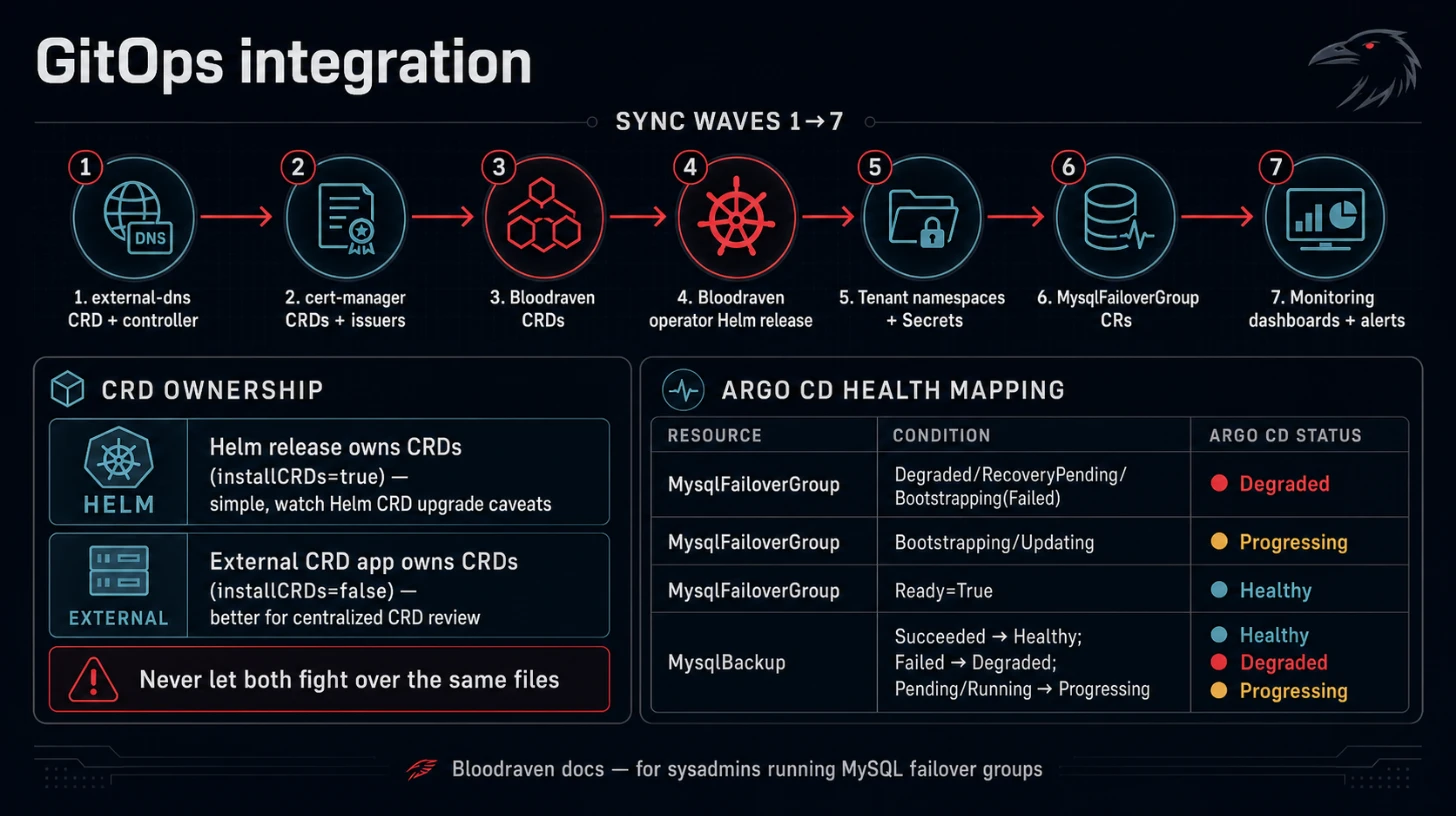
Use this page for Argo CD or Flux-managed Bloodraven installs. It covers resource ownership, sync order, custom health checks, and upgrade sequencing.
CRD ownership
Pick one CRD owner:
| Owner | Notes |
|---|---|
| Bloodraven Helm release | Simple first install because Helm applies files in charts/bloodraven/crds/; CRD upgrades still need explicit review/application because Helm does not upgrade CRDs automatically. |
| Platform CRD app | Better for centralized CRD review and ordering; install the operator chart after the CRD app syncs. |
Do not manage the same CRDs in both places.
Sync waves
Recommended order:
- external-dns
DNSEndpointCRD and controller. - cert-manager CRDs and issuers when TLS is enabled.
- Bloodraven CRDs.
- Bloodraven operator Helm release.
- Tenant namespaces and Secrets.
MysqlFailoverGroupresources.- Monitoring dashboards and alert rules.
Argo CD health checks
Argo CD does not know how to evaluate MysqlFailoverGroup or MysqlBackup custom resources by default. Without custom health checks, the resources show Unknown in the Argo CD UI.
Bloodraven ships Lua health scripts in charts/bloodraven/argocd/ that map custom resource (CR) status to Argo CD health:
| CR | Condition or field | Argo CD health |
|---|---|---|
MysqlFailoverGroup | Degraded=True, RecoveryPending=True, or Bootstrapping=True with reason=Failed | Degraded |
MysqlFailoverGroup | Bootstrapping=True or Updating=True | Progressing |
MysqlFailoverGroup | Ready=True | Healthy |
MysqlBackup | phase: Succeeded | Healthy |
MysqlBackup | phase: Failed | Degraded |
MysqlBackup | phase: Pending or Running | Progressing |
Patch argocd-cm directly
Extract the chart and apply the patch file:
helm pull bloodraven/bloodraven --untar
kubectl patch configmap argocd-cm -n argocd \
  --patch-file bloodraven/argocd/argocd-cm-patch.yaml
kubectl rollout restart deployment argocd-application-controller -n argocd
Use Argo CD Helm chart values
If you deploy Argo CD with its Helm chart, extract the Lua scripts from the Bloodraven chart:
helm pull bloodraven/bloodraven --untar
Then copy the contents of bloodraven/argocd/health-mysqlfailovergroup.lua and bloodraven/argocd/health-mysqlbackup.lua into your Argo CD values:
configs:
  cm:
    resource.customizations.health.shipstream.io_MysqlFailoverGroup: |
      # paste contents of bloodraven/argocd/health-mysqlfailovergroup.lua
    resource.customizations.health.shipstream.io_MysqlBackup: |
      # paste contents of bloodraven/argocd/health-mysqlbackup.lua
Use a Kustomize overlay
If you manage Argo CD with Kustomize, extract the patch from the chart and add it as a strategic merge patch:
helm pull bloodraven/bloodraven --untar
cp bloodraven/argocd/argocd-cm-patch.yaml .
patchesStrategicMerge:
  - argocd-cm-patch.yaml
Verify Argo CD health checks
Check that argocd-cm contains Bloodraven customizations:
kubectl get configmap argocd-cm -n argocd -o yaml | grep shipstream
After Argo CD refreshes the application, MysqlFailoverGroup and MysqlBackup resources should show Healthy, Progressing, or Degraded instead of Unknown.
Ignore status fields
GitOps tools should not try to reconcile .status.
Generated dashboards
If Grafana dashboard ConfigMaps are rendered by the Bloodraven Helm release, keep them in the operator application. If your monitoring stack owns dashboards centrally, set grafanaDashboards.enabled=false and import charts/bloodraven/dashboards/*.json in that stack.
Safe upgrade workflow
- Read Upgrade Policy.
- Apply CRD updates before controller image updates.
- Roll the operator.
- Watch reconciliation on a non-production failover group.
- Roll tenant groups in maintenance windows if sidecar/MySQL image changes are involved.
- Run
make generate && make manifestsbefore PRs that touch API fields.