Operations
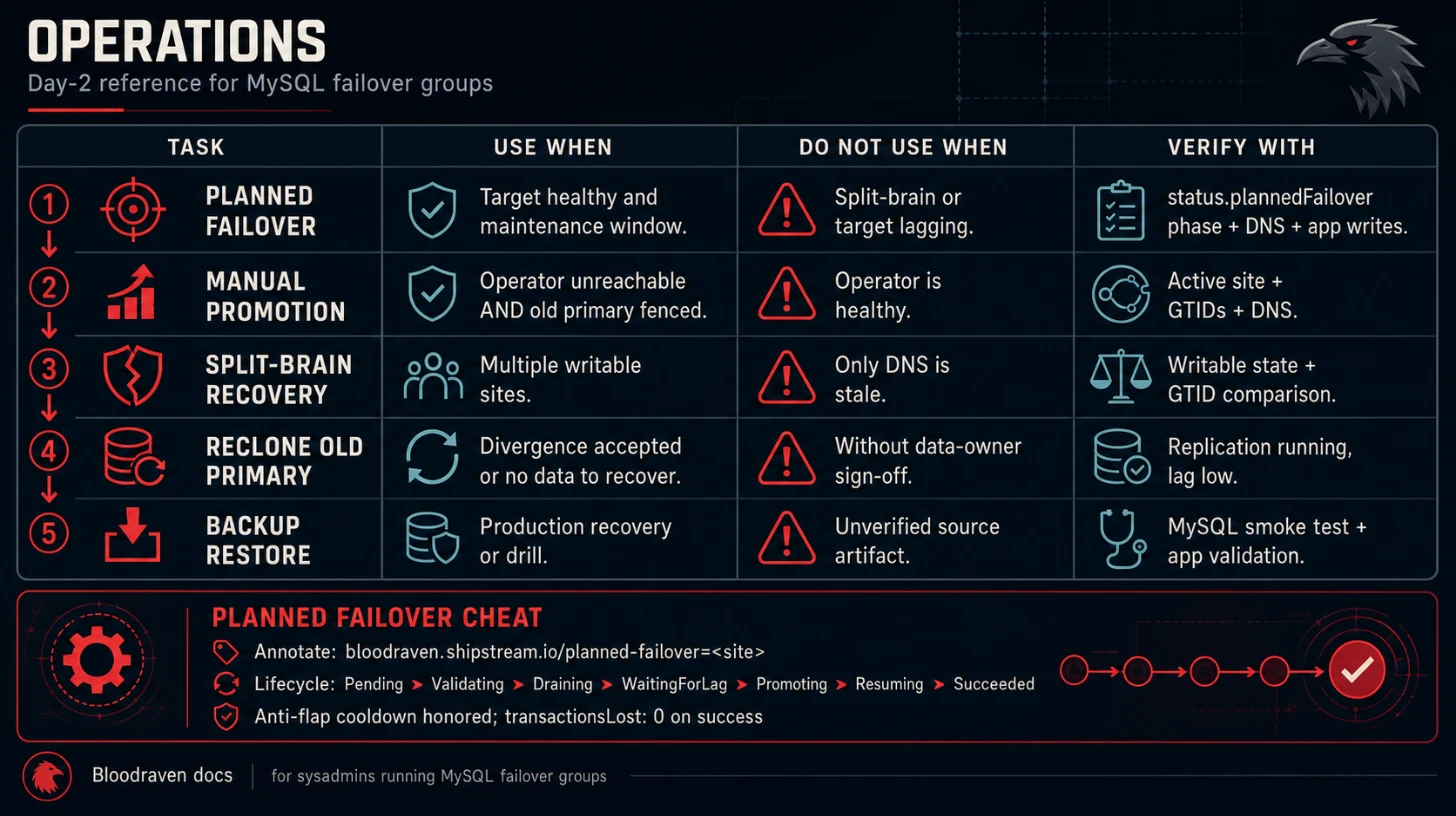
Day-2 operations guide for managing Bloodraven failover groups, including manual intervention, recovery procedures, and maintenance tasks. Before rolling Bloodraven out to production, also walk through the Production hardening checklist and keep the Failure-mode matrix open during incidents. The Log schema contract lists the stable msg strings to filter on when correlating an incident in your log aggregator.
:::tip Incident entry point Use Operations Overview, Runbooks, and Alert To Runbook Map during active incidents. This page remains the detailed operations reference. :::
:::tip CLI shortcut
Most day-2 commands on this page have a kubectl bloodraven ... equivalent in the kubectl plugin. The plugin validates inputs before posting, supports synchronous --wait, and keeps the annotation grammar honest.
:::
Operations decision table
| Task | Use when | Do not use when | Verify with |
|---|---|---|---|
| Planned failover | Healthy target and scheduled maintenance | Split-brain or target lagging | status.plannedFailover, DNS, app writes |
| Manual promotion | Operator unavailable and old primary fenced | Operator is healthy | active site, GTIDs, DNS |
| Split-brain recovery | Multiple writable sites | Only DNS is stale | writable state and GTID comparison |
| Reclone old primary | Divergence accepted or no data to recover | Data owner has not reviewed divergence | replication running and lag low |
| Backup restore | Production recovery or drill | Source artifact unverified | MySQL smoke test and app validation |
Planned failover (graceful switchover)
To promote a replica during planned maintenance, annotate the MysqlFailoverGroup with the target site name. The operator drains writes on the current primary, waits for the target to catch up, and promotes it atomically -- no kubectl exec required.
kubectl annotate mysqlfailovergroup orders \
  bloodraven.shipstream.io/planned-failover=pdx
Optional per-request override (otherwise the spec.plannedFailover defaults apply):
kubectl annotate mysqlfailovergroup orders \
  bloodraven.shipstream.io/planned-failover=pdx:maxLagWait=30s
Watch progress on the CR:
kubectl get mysqlfailovergroup orders \
  -o jsonpath='{.status.plannedFailover}{"\n"}'
The state machine advances through Pending → Validating → Draining → WaitingForLag → Promoting → Resuming → Succeeded, emitting Kubernetes Events (PlannedFailoverStarted, PlannedFailoverDraining, PlannedFailoverLagOK, PlannedFailoverCompleted) at each transition. See Planned failover for the full lifecycle, rollback behaviour, and RPO guarantees.
Unlike the legacy kubectl exec dance below, this path:
- Respects the anti-flap cooldown. A planned failover cannot run within
spec.failoverCooldownof the last failover (planned or emergency). - Guarantees zero RPO on success. Promotion only proceeds after
GTID_EXECUTEDon the target ⊇ the fenced source. - Rolls back on timeout. If the target does not catch up within
maxLagWait, the operator clears the fence on the source and reportsstatus.plannedFailover.phase: Failedwithreason: LagTimeout. - Leaves an audit trail. Every attempt is recorded on the CR and in the
bloodraven_planned_failovers_total{result=...}counter.
Manual promotion (fallback, operator unreachable)
If the operator is unreachable and you must promote a site by hand, the legacy three-step dance still works. Use this only as a break-glass procedure; prefer the annotation API above whenever the operator is healthy.
Step 1: Fence the current primary
SOURCE_POD=$(kubectl get pod -n orders \
  -l app.kubernetes.io/name=mysql,shipstream.io/failover-group=orders,shipstream.io/site=iad \
  -o jsonpath='{.items[0].metadata.name}')
kubectl exec -n orders "$SOURCE_POD" -c mysql -- \
  mysql -u root -p -e "SET GLOBAL super_read_only=ON;"
Step 2: Stop and reset replication on the target
TARGET_POD=$(kubectl get pod -n orders \
  -l app.kubernetes.io/name=mysql,shipstream.io/failover-group=orders,shipstream.io/site=pdx \
  -o jsonpath='{.items[0].metadata.name}')
kubectl exec -n orders "$TARGET_POD" -c mysql -- \
  mysql -u root -p -e "STOP REPLICA; RESET REPLICA ALL;"
Step 3: Promote the target
TARGET_POD=$(kubectl get pod -n orders \
  -l app.kubernetes.io/name=mysql,shipstream.io/failover-group=orders,shipstream.io/site=pdx \
  -o jsonpath='{.items[0].metadata.name}')
kubectl exec -n orders "$TARGET_POD" -c mysql -- \
  mysql -u root -p -e "SET GLOBAL read_only=0;"
When the operator returns it will observe the new topology on its next poll cycle and update Services, DNS, and taints accordingly. No operator restart is required.
Manual promotion bypasses the anti-flap cooldown and the zero-lag gate. Ensure you understand the current replication state before promoting a site -- data loss is possible if the target has not finished applying relay logs. The planned-failover API above is safer; reach for this only when the operator is genuinely unavailable.
Split-brain recovery
If both sites report writable (split brain), the operator will not take automatic action. You must resolve this manually:
-
Identify the authoritative site -- determine which site has the most recent data by comparing GTID sets:
IAD_POD=$(kubectl get pod -n orders \-l app.kubernetes.io/name=mysql,shipstream.io/failover-group=orders,shipstream.io/site=iad \-o jsonpath='{.items[0].metadata.name}')PDX_POD=$(kubectl get pod -n orders \-l app.kubernetes.io/name=mysql,shipstream.io/failover-group=orders,shipstream.io/site=pdx \-o jsonpath='{.items[0].metadata.name}')kubectl exec -n orders "$IAD_POD" -c mysql -- \mysql -u root -p -e "SELECT @@gtid_executed;"kubectl exec -n orders "$PDX_POD" -c mysql -- \mysql -u root -p -e "SELECT @@gtid_executed;" -
Fence the non-authoritative site:
PDX_POD=$(kubectl get pod -n orders \-l app.kubernetes.io/name=mysql,shipstream.io/failover-group=orders,shipstream.io/site=pdx \-o jsonpath='{.items[0].metadata.name}')kubectl exec -n orders "$PDX_POD" -c mysql -- \mysql -u root -p -e "SET GLOBAL super_read_only=ON;" -
Re-establish replication from the authoritative site to the fenced site:
PDX_POD=$(kubectl get pod -n orders \-l app.kubernetes.io/name=mysql,shipstream.io/failover-group=orders,shipstream.io/site=pdx \-o jsonpath='{.items[0].metadata.name}')kubectl exec -n orders "$PDX_POD" -c mysql -- \mysql -u root -p -e "STOP REPLICA;RESET REPLICA ALL;CHANGE REPLICATION SOURCE TOSOURCE_HOST='mysql-orders-iad-internal.orders.svc.cluster.local',SOURCE_USER='replicator',SOURCE_PASSWORD='<replicator-password>',SOURCE_AUTO_POSITION=1;START REPLICA;"Read the replicator password from the failover group's credentials Secret. If the group enforces TLS for replication, include the corresponding
SOURCE_SSL_*options from your MySQL TLS setup as well. -
The operator will detect the corrected topology and resume normal operation.
Split brain means both sites accepted writes independently. You may need to reconcile conflicting data manually before re-establishing replication. Replication will break if conflicting transactions exist on both sides.
Recovering a divergent old primary
After an emergency failover, the old primary may come back with transactions that never replicated. If GTID sets match, the operator sets RecoveryPending=True with reason RecoveryInProgress, reconfigures the old primary as a replica, and clears the condition after replication is healthy. If the old primary has divergent transactions, the operator fences the site and sets RecoveryPending=True with reason DivergentTransactions.
Check the divergence details:
kubectl get mysqlfailovergroup orders -o jsonpath='{range .status.sites[*]}{.name}: recoveryState={.recoveryState} divergentTxns={.divergentTransactionCount} divergentGtid={.divergentGtid}{"\n"}{end}'
To recover the site, investigate the lost transactions and then trigger a reclone:
Step 1: Investigate the lost transactions
Review the divergent GTID set to understand what data was lost. These transactions were committed on the old primary but never reached the replica before failover.
Step 2: Trigger a reclone
Use the reclone annotation to have the operator run CLONE INSTANCE on the divergent site, replacing all its data with a fresh copy from the current primary. The annotation value must include a prefix (8 or more characters) of the observed divergentGtid — this confirmation interlock prevents a fat-fingered site name from destroying the wrong replica:
# Read the divergent GTID first:
DG=$(kubectl get mysqlfailovergroup orders -o jsonpath='{.status.sites[?(@.name=="iad")].divergentGtid}')
echo "$DG"
# a1b2c3d4-0000-0000-0000-000000000000:11-15

# Annotate with <site>:<first-8+-chars-of-GTID>
kubectl annotate mysqlfailovergroup orders bloodraven.shipstream.io/reclone-site=iad:a1b2c3d4
If the prefix doesn't match the observed divergentGtid (wrong site, stale copy of the GTID, typo), the operator emits a RecloneRejected Warning Event and clears the annotation — no clone is started. Re-read status.sites[].divergentGtid and try again.
A RecloneRequested Normal Event marks the start. The site will temporarily appear unreachable during the MySQL restart that follows the clone. Progress is reported in the Bootstrapping condition.
Recloning a read-only site
A reader is a valid clone recipient but never a donor. If a reader has lost its PVC or source convergence is blocked and its data can be discarded, use the plugin's destructive cold-reclone confirmation:
kubectl bloodraven reclone <group> <reader-site> --cold
For example:
kubectl bloodraven reclone orders reader --cold
The operator validates a uniquely writable primary-candidate donor before
starting CLONE INSTANCE. The reader client Service has no healthy endpoint
while clone, catch-up, or direct-source convergence is incomplete. Clone
reads from the active primary at full speed and is not throttled.
Troubleshooting blocked source convergence
Inspect the generic source fields independently of old-primary recovery:
kubectl get mysqlfailovergroup orders \
  -o jsonpath='{range .status.sites[*]}{.name}: source={.sourceHost} state={.sourceConvergenceState} reason={.sourceConvergenceReason}{"\n"}{end}'
Pending/SourceMismatchmeans the observed source is not the confirmed primary and convergence has not completed.Pending/ProbeFailedorPending/MutationFailedmeans a probe or boundedSTOP REPLICA/CHANGE REPLICATION SOURCE TO/START REPLICAattempt failed. Check the four stable convergence log events and theirstage.Blocked/GTIDDivergedmeans the active primary does not contain the follower's executed GTID set. Bloodraven intentionally leaves the channel unchanged, or stopped if the second containment check failed after STOP. Do not reset replication metadata to force a rejoin. Review the GTIDs and preserve any required data before recloning.
Convergence is also deliberately paused during bootstrap, ordered updates,
restore, topology freeze, pending promotion, planned failover, and split
brain. Resolve or allow that operation to finish before treating Pending
as a source fault.
PVC loss recovery runbook
Use this when one site's MySQL data PVC is irrecoverable: cloud volume deleted, local disk lost, filesystem corrupted beyond repair, or a failed clone left the data directory unusable.
:::danger Data loss boundary If the lost PVC belonged to a primary that accepted writes not yet replicated elsewhere, those transactions are unrecoverable from Bloodraven. PITR can only replay binlog files that survived long enough to be archived; a lost primary PVC takes its unarchived binlog tail with it. See Durability and RPO. :::
1. Identify the failed site and current primary
kubectl get mysqlfailovergroup orders \
  -o jsonpath='{.status.activeSite}{"\n"}{range .status.sites[*]}{.name}: state={.state} recovery={.recoveryState} divergent={.divergentGtid}{"\n"}{end}'
Do not wipe the active primary unless you are deliberately restoring from backup. If the damaged site is the active primary, first let the operator fail over or run a planned failover to a healthy primary-candidate site.
2. Confirm the target has no recoverable divergent data
For normal old-primary divergence, use the GTID-prefix reclone flow above. For PVC loss, the target has no usable data to preserve, so the operator accepts a cold reclone with an explicit destructive confirmation:
kubectl bloodraven reclone orders iad --cold
The operator emits RecloneRequested and drives the same clone path used
for automatic bootstrap. It will not reclone the current active primary.
3. If the PVC object itself is bad, delete it
If Kubernetes is still binding the pod to a corrupted claim, delete the site pod and PVC so the operator can recreate storage from the CR spec:
IAD_POD=$(kubectl get pod -n orders \
  -l app.kubernetes.io/name=mysql,shipstream.io/failover-group=orders,shipstream.io/site=iad \
  -o jsonpath='{.items[0].metadata.name}')
kubectl delete pod -n orders "$IAD_POD"
kubectl delete pvc -n orders mysql-orders-iad-data
If your cluster uses local-path storage, clear any db-readonly taint
from the node before deleting the PVC; otherwise the provisioner's helper
pod may be evicted and the replacement claim can stay Pending.
4. Watch bootstrap and clone progress
kubectl describe mysqlfailovergroup orders
kubectl get pods -l shipstream.io/failover-group=orders -w
Expected condition flow:
| Phase | What you should see |
|---|---|
| Requested | RecloneRequested Event on the MysqlFailoverGroup. |
| Bootstrapping | Bootstrapping=True; the target site pod may restart while CLONE INSTANCE replaces the data directory. |
| Recovering | The cloned site comes back read-only and replication is configured from the active primary. |
| Healthy | Bootstrapping=False, RecoveryPending=False, target state=read-only, recoveryState empty, replication running, and divergentGtid empty. |
Clone time is proportional to dataset size and storage throughput. Small playground datasets finish in minutes; production datasets can take much longer.
5. Verify the site rejoined safely
kubectl get mysqlfailovergroup orders \
  -o jsonpath='{range .status.sites[*]}{.name}: state={.state} replicating={.replicating} lag={.secondsBehindSource} recovery={.recoveryState}{"\n"}{end}'
The recovered site should be read-only, replicating from the current
primary, and below your spec.replication.maxLagSeconds threshold before
you consider the incident closed.
If the old primary came back with no divergence (GTID sets match), the operator automatically reconfigures it as a replica — no manual intervention is needed. The RecoveryPending condition only appears when divergent transactions exist.
Total loss recovery
If both sites are unreachable, the operator cannot take any action. Recovery steps:
- Investigate infrastructure (nodes, network, storage) at both sites
- Bring at least one MySQL instance back online
- The operator will detect the recovered site and begin normal operation
- Once the second site is back, re-establish replication if it does not resume automatically
Scaling storage
To resize PVCs, update the spec.sites[].storage.size field. This requires the StorageClass to support volume expansion (allowVolumeExpansion: true).
spec:
  sites:
    - name: iad
      storage:
        storageClassName: fast-ssd
        size: 200Gi  # increased from 100Gi
The operator will update the PVC. The underlying volume expansion behavior depends on your storage provider -- some require a pod restart.
Updating MySQL version
Change spec.image to the new version:
spec:
  image: mysql:9.7
If updateStrategy: OrderedUpdate is set, the rollout follows the ordered update sequence with zero downtime. Otherwise, both sites are updated simultaneously.
See the Upgrade and version-skew policy for the supported MySQL baseline and the cross-site and sidecar ↔ operator skew contract.
Updating the sidecar
Change spec.sidecarImage:
spec:
  sidecarImage: ghcr.io/shipstream/bloodraven-sidecar:v2.0.0
This follows the same update strategy as MySQL image changes.
Rotating MySQL credentials
Credentials mode (spec.credentials)
When using per-role credential secrets, rotation is fully automated:
- Update the
passwordvalue in the relevant Kubernetes Secret (e.g.mysql-operator-creds) - The operator detects the change, connects to the primary, and runs
ALTER USERto update the MySQL password - Pods are rolling-restarted to pick up the new credentials from the updated Secret
No manual MySQL commands or operator restarts are needed.
Legacy mode (spec.secretName)
- Update the password on both MySQL instances directly
- Update the Kubernetes Secret referenced by
spec.secretName - Restart the operator to pick up the new credentials (or wait for the Secret to be reloaded, depending on your Secret mounting configuration)
DNS provider configuration
DNS provider credentials and settings are managed entirely by external-dns, not by Bloodraven. To change your DNS provider or rotate provider credentials, update your external-dns deployment configuration. Bloodraven only manages the DNSEndpoint CR; external-dns handles syncing it to the actual DNS provider.
Maintenance mode
To prevent automatic failovers during maintenance (e.g., network changes), you can temporarily increase the failover cooldown:
kubectl patch mysqlfailovergroup orders --type merge -p '
  {"spec": {"failoverCooldown": "24h"}}'
Restore it after maintenance:
kubectl patch mysqlfailovergroup orders --type merge -p '
  {"spec": {"failoverCooldown": "30m"}}'
Deleting a failover group
The operator uses a finalizer to ensure graceful cleanup when a MysqlFailoverGroup is deleted:
- Node taints are removed from all sites
- The
DNSEndpointCR is automatically garbage-collected via its owner reference to theMysqlFailoverGroup - MySQL pods, Services, PVCs, and the PodDisruptionBudget are deleted
- The finalizer is removed and the CR is deleted
To delete:
kubectl delete mysqlfailovergroup orders
PVCs are deleted as part of cleanup. If you need to preserve data, back up the MySQL instances before deleting the failover group.