Playground
The playground deploys a fully working Bloodraven setup on your local machine so you can watch failovers happen in real time. It runs inside any multi-node Kubernetes cluster and includes a live dashboard, a counter app that proves data survives failovers, and a simulated DNS pipeline.
No cloud account, no DNS provider, no production infrastructure required.
The playground is the recommended learning path before production. It lets you see failover, DNS steering, taints, backup, restore, and dashboard state without touching real infrastructure.
What you get
- Three-site MySQL cluster with promotable IAD/PDX sites and a dedicated non-promotable reader
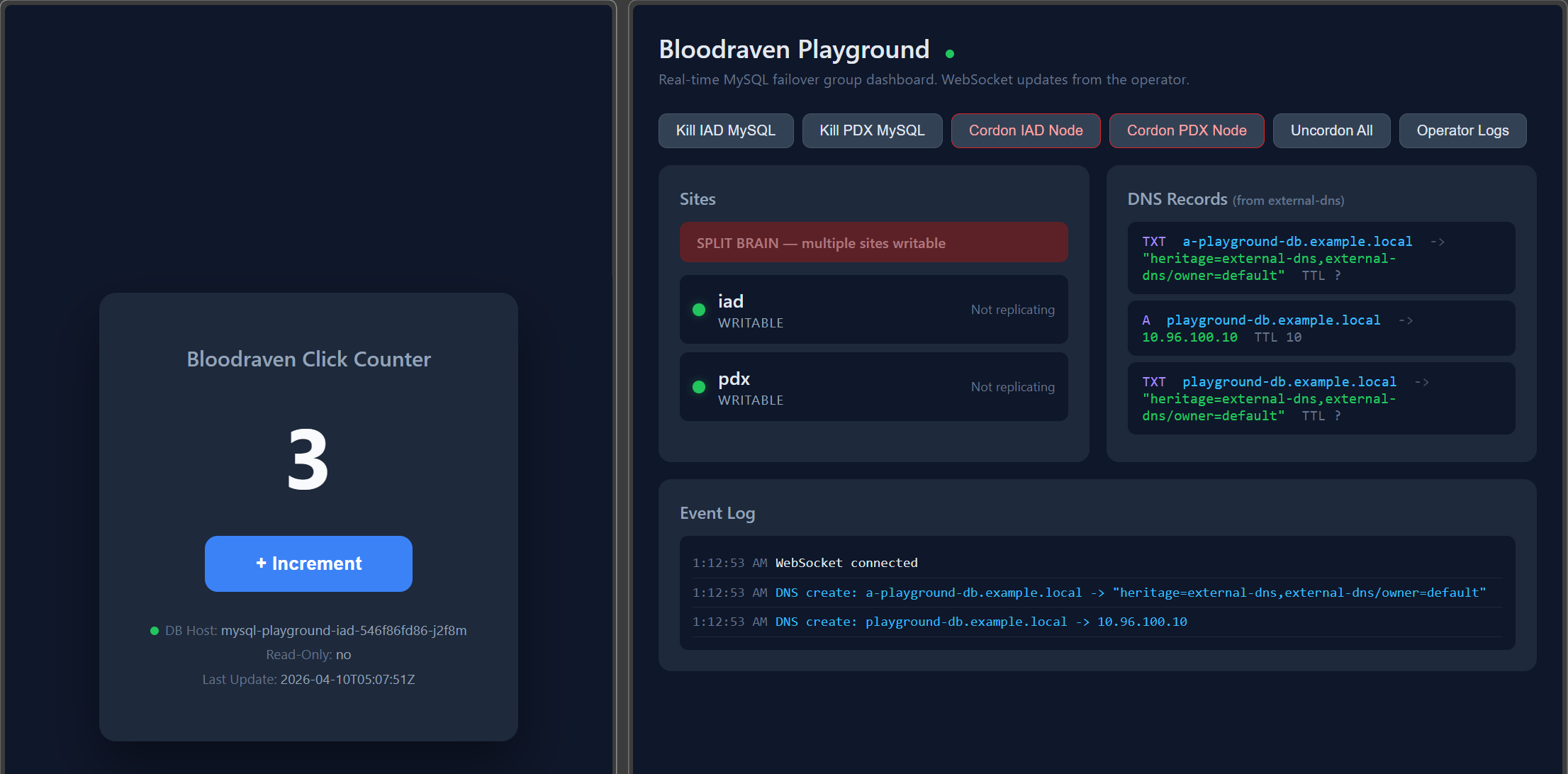
- Real-time dashboard showing site health, replication state, DNS records, and an event log
- Counter app that writes to MySQL through the primary service, proving state persists across failovers
- Simulated external-dns pipeline — the operator creates
DNSEndpointCRs, external-dns watches them and pushes records to an in-memory webhook provider, and the dashboard displays the results - Chaos tools for triggering failovers by killing pods, cordoning nodes, or simulating network partitions
Prerequisites
You need three tools installed:
- docker or podman — for building container images. Docker is preferred because k3d's podman support is experimental and the image-load path is faster on docker. Set
BLOODRAVEN_CONTAINER_RUNTIME=podmanto force podman if both are installed. - kubectl — for talking to your cluster
- helm — for deploying the operator
And a local Kubernetes cluster with at least 3 worker nodes. The third worker is dedicated to the read-only reader so storage-loss testing is deterministic. We recommend k3d because it's fast and lightweight, but kind and minikube work too.
Create a cluster with k3d (recommended)
# Install k3d if you haven't already
curl -s https://raw.githubusercontent.com/k3d-io/k3d/main/install.sh | bash

# Create a cluster with 3 worker nodes
k3d cluster create bloodraven --agents 3
That's it. You now have a 4-node cluster (1 server + 3 agents) ready to go.
Using kind or minikube instead
kind:
cat <<EOF | kind create cluster --config=-
kind: Cluster
apiVersion: kind.x-k8s.io/v1alpha4
nodes:
  - role: control-plane
  - role: worker
  - role: worker
  - role: worker
EOF
minikube:
minikube start --nodes=4 --cpus=2 --memory=2048 --driver=docker
Setup
From the root of the repository:
./playground/setup.sh
This single script handles everything:
- Verifies your cluster has at least 3 worker nodes
- Labels dedicated workers for IAD, PDX, and the reader zone
- Builds all container images locally
- Loads images into your cluster (auto-detects k3d, kind, or minikube)
- Installs the CRDs, namespace, RBAC, and operator via Helm
- Creates a
MysqlFailoverGroupwith two primary candidates and oneread-onlyreader - Seeds a DNS record so the external-dns pipeline works immediately
- Deploys the dashboard and counter app
The default reader site intentionally omits lbIP and taintNodeSelector. It demonstrates reader-specific mysqlConf, a site-only NodePort Service override, and replication.readOnlyMaxLagSeconds; the priorities remain [iad, pdx], so the reader cannot be promoted.
Setup takes about 2 minutes depending on your machine.
Expected timings
| Action | Typical time |
|---|---|
| Full setup | About 2 minutes |
| Pod-kill failover | About 30-45 seconds when relay-log drain waits on a dead primary |
| Operator rebuild | About 30-90 seconds after image build |
| Sidecar rebuild | Several minutes because MySQL pods restart |
| Local backup test | Depends on data size; small playground data is usually under 1 minute |
| Local restore test | Depends on data size; small playground data is usually a few minutes |
Script to production concept map
| Script | Production concept |
|---|---|
./playground/setup.sh | CRD install, Helm install, tenant failover group bootstrap |
./playground/rebuild.sh operator | Operator rollout after controller changes |
./playground/rebuild.sh sidecar | MySQL pod rolling update after sidecar changes |
./playground/chaos.sh kill-site iad | Primary crash and emergency failover |
./playground/chaos.sh cordon pdx | Site capacity or scheduling failure |
./playground/chaos.sh recover | Infrastructure recovery after an incident |
./playground/reset-mysql.sh | Destructive lab reset, not a production recovery command |
Reset when things go wrong
./playground/chaos.sh recover
./playground/reset-mysql.sh
./playground/rebuild.sh operator sidecar
First-run divergence (one-time reclone)
On a brand-new cluster, both MySQL pods come up writable before the operator picks an active site. The pod that loses the election may have already executed a few transactions of its own (server UUID), which the operator surfaces as RecoveryPending with a non-zero divergentTransactionCount. Until that's cleared, planned failover to the loser will be rejected with "site is read-only but not replicating".
To resolve, copy the divergent-GTID prefix from kubectl get mysqlfailovergroup playground -o yaml (look for divergentGtid) and confirm the reclone:
# Inspect the divergence
kubectl -n bloodraven-playground get mysqlfailovergroup playground -o yaml \
  | grep -A1 divergentGtid

# Annotate with <site>:<first-segment-of-divergent-gtid> as the confirmation token.
# Example: divergentGtid 61553741-443a-11f1-... → reclone-site=pdx:61553741
kubectl -n bloodraven-playground annotate mysqlfailovergroup playground \
  bloodraven.shipstream.io/reclone-site=pdx:61553741 --overwrite
The reclone takes ~60s. Expected outcome: state=read-only, replicating=true, recoveryState cleared. After that the planned failover demo below will work.
Access the apps
Use kubectl port-forward to access the dashboard and counter app:
# Dashboard (real-time cluster visualization)
kubectl -n bloodraven-playground port-forward svc/dashboard 8091:8091

# Counter app (write-through-failover demo)
kubectl -n bloodraven-playground port-forward svc/counter-app 8090:8090
Then open http://localhost:8091 for the dashboard and http://localhost:8090 for the counter app.
Remote access Add --address 0.0.0.0 to port-forward if you want to reach the apps from another machine (e.g. over Tailscale).
Try a failover
The dashboard toolbar has buttons that copy kubectl commands to your clipboard. You can also run them directly:
# Kill the IAD MySQL pod — the operator will detect the outage and fail over to PDX
kubectl delete pod -n bloodraven-playground -l shipstream.io/site=iad

# Or cordon the IAD node to simulate a full site outage
kubectl cordon $(kubectl get nodes -l topology.kubernetes.io/zone=zone-iad -o name)
Watch the dashboard — you'll see the site state change, the health banner update, DNS records flip, and the counter app reconnect to the new primary.
To restore the cordoned node:
kubectl uncordon $(kubectl get nodes -o name | tr '\n' ' ')
Chaos script
For more advanced scenarios, use the chaos script:
./playground/chaos.sh kill-site iad           # Kill MySQL+Dragonfly pods at a site
./playground/chaos.sh kill-site pdx
./playground/chaos.sh cordon iad              # Cordon a site's node
./playground/chaos.sh network-partition iad   # Simulate a network partition
./playground/chaos.sh kill-dragonfly iad      # Kill only the Dragonfly pod at a site
./playground/chaos.sh dragonfly-status        # Print Dragonfly roles, traffic labels, and active endpoints
./playground/chaos.sh recover                 # Undo all chaos
Automated chaos suite
Beyond the interactive scripts, 30+ scripted chaos scenarios (primary
kills, operator crashes mid-failover, network partitions, self-fencing,
GTID divergence, data wipes, rolling updates, Dragonfly failover,
backup and PITR verification) are automated by the playground-chaos
runner. Each scenario states a hypothesis, injects real faults into the
cluster, asserts on operator behavior, and captures full forensics on
failure:
make chaos-list                                  # List every scenario with its hypothesis
make chaos-run SCENARIO=06-self-fence-isolated-primary
make chaos-run SCENARIO=40-reader-data-loss-reclone
make chaos-run-all-profile PROFILE=smoke         # Core failover subset (~5 minutes)
make chaos-run-all                               # The full suite
Scenarios 40-44 cover the dedicated read-only reader site end to end:
- 40 deterministically interprets reader node/storage loss as Deployment scale-down plus PVC replacement on the dedicated reader worker. It continuously proves reader loss does not unset group
Ready, verifies the reader client endpoint is shed during clone/catch-up, and confirms direct-source replication and endpoint return after auto-clone. - 41 answers reader
SELECTs continuously through an unplanned failover (staleness allowed, availability required) and asserts the reader repoints directly to the new primary with no chained or blocked intermediate state. - 42 (smoke profile) stalls only the reader with
SOURCE_DELAYand proves unbounded reader lag has zero group-level effect: no failover, no cooldown consumed, just endpoint shedding plus alertable status and metrics. - 43 makes the reader anomalously writable with an errant row: the operator fences it without debounce, a planned failover targeting it is rejected with the role error, and the errant GTID blocks source convergence at the containment gate instead of silently repointing.
- 44 manually repoints the reader at the standby and proves direct-source convergence is a poll-loop invariant — any wrong-source state heals, with the documented convergence log events and no failover.
This same suite is Bloodraven's E2E test bed in CI: the full suite runs nightly against a real Kubernetes cluster, and the smoke profile gates every release — a tag cannot publish images or charts unless core failover works on a live cluster. The current status is on the E2E workflow badge.
Dragonfly co-management
The playground MysqlFailoverGroup enables spec.dragonfly, so Bloodraven also creates one Dragonfly StatefulSet per site (playground-dragonfly-iad, playground-dragonfly-pdx, and playground-dragonfly-reader), one Dragonfly PodDisruptionBudget per site, and a single app-facing playground-dragonfly Service whose endpoints follow the active site. The Service selector AND-gates shipstream.io/dragonfly-role=master AND shipstream.io/dragonfly-traffic=enabled: removing the traffic label sheds an endpoint atomically, which is how planned failover avoids a window where both the old and new master would match the selector during REPLTAKEOVER. Disable Dragonfly by removing the spec.dragonfly block.
Bloodraven supports Dragonfly v1.38.0+ for managed deployments. The playground pins docker.dragonflydb.io/dragonflydb/dragonfly:v1.38.0; avoid older tags because several replication, snapshot, and expiry bugs were fixed before this baseline.
Bloodraven treats Dragonfly as cache/session state, not durable application data. The operator provisions ephemeral storage, does not manage Dragonfly backups or snapshot schedules, and does not support DFLY LOAD against a live master with attached replicas because loaded data bypasses the replication journal. Topology changes can force full replica resyncs and briefly increase master latency, so schedule planned failovers and Dragonfly image rollouts the same way you would schedule cache-impacting maintenance.
The baseline playground does not enable spec.dragonfly.snapshot. That keeps normal Dragonfly pods independent of the optional RustFS/S3 path; Dragonfly v1.38 exits during startup when an S3 snapshot directory is configured but the bucket or credentials are unavailable. The D6a snapshot-restore upgrade scenario provisions the RustFS bucket on demand, temporarily enables the snapshot config, and validates that Dragonfly pods restart with the S3 snapshot directory before it requests the upgrade.
The operator owns the safety-critical Dragonfly flags it emits (--port, --admin_port, --requirepass, --break_replication_on_master_restart, and related sizing knobs). Extra spec.dragonfly.args are an escape hatch for site-specific tuning; do not use them to enable tiered storage, ACL files, Lua compatibility relaxations, TLS replication, snapshot scheduling, or load/import workflows unless the operational tradeoff is documented for that deployment.
Verify the cache subsystem before exercising failover:
# Both per-site StatefulSets reach Ready
kubectl -n bloodraven-playground get statefulset -l app.kubernetes.io/name=dragonfly

# Operator's view of which site is master, plus pod role/traffic labels
# and the active Service endpoints
./playground/chaos.sh dragonfly-status
For ad-hoc Redis-protocol queries (replication state, GET/SET against a key), launch a one-shot pod with redis-cli:
kubectl -n bloodraven-playground run redis-cli --rm -it --restart=Never \
  --image=redis:7-alpine -- redis-cli -h playground-dragonfly INFO replication
The counter app (http://localhost:8090 after port-forward) writes to both MySQL and Dragonfly on every increment. The MySQL counter is durable; the Dragonfly counter (shown as "Cache (Dragonfly)" below the main number) is the session/cache continuity signal. After a planned failover with sessionsPreserved=true, the Dragonfly counter survives. After an emergency failover, it usually resets to 0 because the new master may have been an unsynced replica or a freshly-promoted empty pod.
Exercise a planned failover that includes Dragonfly session preservation:
# Click "+ Increment" a few times in the counter UI so both counters are non-zero.

# Trigger a planned failover to pdx
kubectl -n bloodraven-playground annotate mysqlfailovergroup playground \
  bloodraven.shipstream.io/planned-failover=pdx

# Watch the planned-failover status walk WaitingForLag → WaitingForDragonflySync
# → PromotingDragonfly → Promoting → Resuming → Succeeded.
kubectl -n bloodraven-playground get mysqlfailovergroup playground \
  -o jsonpath='{.status.plannedFailover.phase}{"\n"}'

# After Succeeded, sessionsPreserved should be true on the success path.
kubectl -n bloodraven-playground get mysqlfailovergroup playground \
  -o jsonpath='{.status.plannedFailover.dragonfly}{"\n"}'

# Reload the counter UI — both the MySQL and the Dragonfly counter should
# be unchanged. The active Service now resolves to the pdx Dragonfly pod.
Emergency Dragonfly behavior is best-effort. Killing the active MySQL pod while Dragonfly is healthy still completes the MySQL emergency failover; Dragonfly is promoted via REPLTAKEOVER (sessions preserved when reachable) or REPLICAOF NO ONE (sessions lost), and never blocks MySQL recovery past a 10-second budget.
The D6a snapshot-restore upgrade path can be exercised directly:
make chaos-run SCENARIO=29-dragonfly-snapshot-upgrade
The ordinary Dragonfly image rollout path is covered separately and patches the image to a cached digest reference so it does not depend on pulling a new external tag:
make chaos-run SCENARIO=27-dragonfly-rolling-image-update
Exercise backup verification
The playground's minio backup profile ships with scheduled verification enabled (*/30 * * * *). The operator materializes a CronJob that fires bloodraven trigger-verification on the schedule, which creates a MysqlBackupVerification CR against the latest Succeeded MysqlBackup and copies the profile's verification block (sanityCheck, etc.) onto the CR.
To drive the feature by hand without waiting for the schedule:
# Create a bare verification and wait for it to reach a terminal phase.
# This skips profile-level inheritance (no sanityCheck / pointInTime);
# see below for the scheduled-contract path.
./playground/verify-backup.sh run minio

# List all verifications with their phase
./playground/verify-backup.sh status

# Tail the Job pod log for the most recent verification
./playground/verify-backup.sh logs

# Remove completed runs
./playground/verify-backup.sh cleanup            # Succeeded only
./playground/verify-backup.sh cleanup --failed   # Failed only

# Inspect the scheduled CronJob the operator materialized
./playground/verify-backup.sh schedule-list
To run the full scheduled contract on demand — the CR built exactly the way the CronJob would build it, including the profile's sanityCheck — fire the operator's CronJob as a one-off Job:
kubectl -n bloodraven-playground create job verify-now \
  --from=cronjob/mysql-playground-verify-minio
A successful run provisions an ephemeral PVC + mysqld, loads the dump, runs the sanity query (if inherited from the profile), and cleans up. On failure the Pod and PVC are retained so you can kubectl exec in and inspect why the load failed.
The playground does not configure PITR binlog archival, so spec.pointInTime on a verification CR will be rejected by the reconciler until spec.backup.pitr.enabled=true (and a binlog archiver) is wired up on the failover group.
Dashboard features
The dashboard connects to the operator via WebSocket and polls DNS state every 3 seconds.
- Health banner — shows overall cluster health at a glance: Healthy (green), Degraded (amber, e.g. replica not replicating), or critical states like Split Brain or No Primary (red, pulsing)
- Site cards — shows each site's state (writable, read-only, unreachable), GTID position, replication status, and lag
- DNS records — shows what external-dns has published, with a fallback to reading DNSEndpoint CRs directly from the Kubernetes API
- Event log — real-time stream of state transitions, failovers, and DNS changes
Rebuilding after code changes
When you change Go code in the operator, sidecar, or any playground app, use the rebuild script to update your running cluster:
# Rebuild everything
./playground/rebuild.sh

# Rebuild only specific components
./playground/rebuild.sh dashboard          # just the dashboard
./playground/rebuild.sh counter            # just the counter app
./playground/rebuild.sh operator sidecar   # operator + sidecar
The script builds the container images (using docker if available, otherwise podman; set BLOODRAVEN_CONTAINER_RUNTIME=podman to force podman), loads them into your cluster, restarts the affected deployments, and waits for rollout to complete.
Valid component names: operator, sidecar, counter, dashboard, dns-webhook.
Useful commands
# Check the failover group status
kubectl -n bloodraven-playground get mysqlfailovergroups

# List all pods
kubectl -n bloodraven-playground get pods

# Check DNS endpoint CRs
kubectl -n bloodraven-playground get dnsendpoints

# Follow operator logs
kubectl -n bloodraven-playground logs -l app.kubernetes.io/name=bloodraven -f
Teardown
To remove everything and start fresh:
./playground/teardown.sh
This deletes the namespace, Helm release, CRDs, and node labels. Your k3d/kind/minikube cluster itself is left intact so you can re-run setup.sh without recreating it.