Production hardening checklist
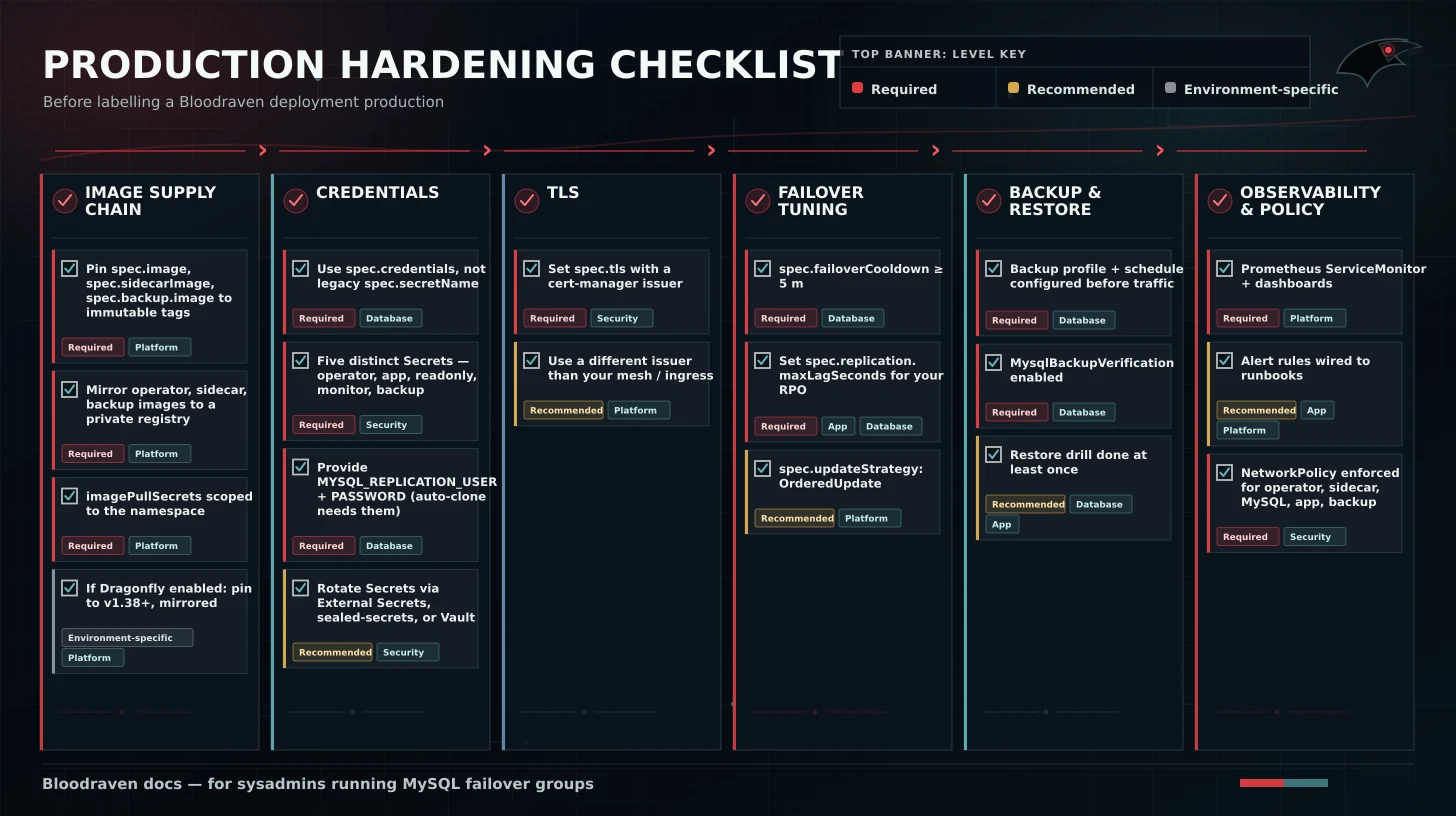
Work through this before labeling a Bloodraven deployment "production". Each bullet links to the page with the setting's detail. Items are grouped; within a group, order doesn't matter.
Requirement levels:
| Level | Meaning |
|---|---|
| Required | Must be satisfied before production traffic. |
| Recommended | Strong default unless your platform has an equivalent control. |
| Environment-specific | Required only when that feature or environment applies. |
Owner hints:
| Owner | Typical responsibilities |
|---|---|
| Platform | Operator install, CRDs, RBAC, node labels, NetworkPolicy, monitoring |
| Database | MySQL sizing, backup, restore, PITR, failover drills |
| App team | Connection pools, DNS caching, write/read endpoint use, app alerts |
| Security | Secrets, TLS, image provenance, network boundaries |
Image supply chain
- Pin
spec.image,spec.sidecarImage, andspec.backup.imageto immutable tags (or digests). No:latest, no MySQL:9, no:edge. A silently-drifting MySQL image breaks dump/restore and sometimes replication. See the Upgrade and version-skew policy for which MySQL tags are supported. - Mirror the operator, sidecar, and backup images to a private registry. A DockerHub rate-limit or Oracle registry outage should never be able to stop a pod from starting mid-incident.
- Verify images are pulled using
imagePullSecretsscoped to the namespace; service-account-wide pulls leak credentials across workloads. - Enable
imagePullPolicy: IfNotPresentonce tags are immutable. - If
spec.dragonfly.enabled=true, pinspec.dragonfly.imageto Dragonflyv1.38.0+, mirror it with the other runtime images, and do not use:latest.
Credentials
- Use
spec.credentials(per-role Secrets), not the legacyspec.secretNameDSN mode. Per-role credentials are required for the backup-verification and PITR paths to hold least privilege. See CRD Reference → CredentialsSpec. - Populate
operatorSecret,appSecret,readOnlySecret,monitorSecret, andbackupSecret— five distinct users. - Store Secrets with a provider that supports rotation (External Secrets Operator, sealed-secrets, Vault). Rotate regularly.
- Supply
MYSQL_REPLICATION_USER/MYSQL_REPLICATION_PASSWORDexplicitly. Without them, automatic old-primary recovery is skipped — see Failover → Prerequisites.
TLS
- Set
spec.tlswith a cert-manager issuer. Bloodraven forcesrequire-secure-transportwhen TLS is configured, so all client traffic is encrypted in-cluster. - Use a separate issuer for MySQL TLS from the one your mesh / ingress uses, so rotating the MySQL cert doesn't churn unrelated workloads.
Failover tuning
- Set
spec.failoverCooldownto ≥ 5 m (the default). Lower values increase the risk of cascade failovers during unstable infrastructure; higher values extend MTTR after a flapping primary comes back. - Set
spec.replication.maxLagSecondsbased on your RPO tolerance. This is an alerting threshold (Degraded=Truewith reasonReplicationLagging), not a promotion gate — treat it as a page-worthy signal, not a soft warning. - Use
spec.updateStrategy: OrderedUpdate(the default). The alternative,Recreate, restarts both MySQL pods simultaneously on any spec change and creates a write outage. Ordered updates roll the replica first, fail over, then roll the former primary — zero write downtime for typical spec changes. - If
spec.dragonfly.enabled=true, choosespec.dragonfly.plannedFailover.onSyncTimeoutdeliberately. The defaultproceedprotects MySQL availability and may discard cache/session continuity;failpreserves the old active site when Dragonfly session preservation cannot be proven.
Storage
- Use a network-attached, topology-aware StorageClass for the
MySQL data PVCs (EBS +
WaitForFirstConsumer, Persistent Disk, Ceph RBD, etc.). NeverhostPathoremptyDir. - Confirm the StorageClass's
reclaimPolicyisRetainfor the MySQL data PVCs.Delete+ a routinekubectl delete pvcturns a pod-restart case into a full reclone. - Confirm the StorageClass supports
allowVolumeExpansion: trueif you anticipate growing storage. Resizing without expansion support means a data migration.
PITR / backups
- Enable PITR (
spec.backup.pitr.enabled: true) with amaxBinlogSizesized for your RPO target. Default100Mbalances rotation overhead against unarchived-tail size; smaller if your write rate is high. - Pick a backup profile storage that is in a different fault domain from the MySQL PVCs (different region / different provider). Backups stored on the same disk as the DB are not backups.
- Configure at least one recurring schedule under
spec.backup.schedules[]and pin itstimeZone. See Backup and restore → TimeZone. - Set a retention policy (
retentionPolicy.count,maxAgeDays,minKeep,maxFailedKeep) on every profile. An unbounded retention is a bill, not a backup strategy. - Run backup-verification externally (restore into a throwaway namespace periodically, assert a sanity query works). Unverified backups are Schrödinger backups.
- Encrypt backups at rest. Set
spec.backup.profiles[].encryption.passphraseSecreton every profile that writes to shared storage. Client-side envelope encryption (AES-256-GCM) keeps the passphrase in a Kubernetes-controlled Secret, so a compromised S3 credential does not expose backup contents. See Backup encryption. Back the passphrase Secret up out-of-band — losing it makes the backups unrecoverable.
Placement
- Label nodes with a fault-domain zone topology label
(e.g.
topology.kubernetes.io/zone=zone-iad). Bloodraven's per-sitespec.sites[].zonetargets nodes vianodeAffinity— without correct node labels the sites will co-locate. - Set per-site
resources.requestsgenerously enough that MySQL has breathing room;resources.limitsoptional for memory only if you're also usinginnodb_buffer_pool_sizetuning. - Honour the
placement contract: apps must
respect the
shipstream.io/db-readonly-<group>node taint that Bloodraven applies to losing sites after a failover.
Observability
- Scrape
bloodravenon:8080/metricsand alert on:bloodraven_state_transitions_totalspikesbloodraven_failovers_totalincrease (at least a warning)bloodraven_replication_lag_secondssustained > your thresholdbloodraven_divergent_transactions > 0(critical — data loss)up{job="bloodraven"} == 0for > 2 ×pollInterval(operator is down; see Monitoring for the full list and recommended rules)bloodraven_dragonfly_site_up == 0andbloodraven_dragonfly_promotions_total{result="failed"}whenspec.dragonfly.enabled=true
- Ship a
PrometheusRuleresource alongside your install with the above expressions baked in. The Helm chart installs aPodMonitorbut not alerting rules; curate your own. - Forward Kubernetes Events for
MysqlFailoverGroupandMysqlBackupCRs somewhere humans read. See Monitoring → Kubernetes Events. - Scrape your sidecars too: PITR archiver status is surfaced via Prometheus gauges the operator exports (labeled by site).
- Publish / log dashboards — Grafana, otherwise the first post-incident question becomes "was this visible?".
Control-plane availability
- Keep the operator's pod up. Use a tight liveness probe and
restartPolicy: Always. Size thePodDisruptionBudgetso the operator isn't evicted during routine node drains — the shipped chart does not ship a PDB for the operator; add one. - Leader election is on by default and stays on. Running multiple operator replicas is fine but doesn't speed up MTTR; the design tradeoffs are in the README's "Non-HA control plane" note.
Network
- Configure NetworkPolicy so the operator Pod can reach both
MySQL Services and the sidecar HTTP endpoint on
:8080. A silently-blocking CNI is the #1 source of spuriousunreachablestates in the state machine. - If
spec.dragonfly.enabled=true, allow the operator to reach the per-site Dragonfly client and admin ports (6379and9999by default), and allow applications to reach only the active<group>-dragonflyService. - Make sure
external-dns(or whatever consumes theDNSEndpointCR) is running. Failover updates the CR, but the actual DNS record only changes when the external-dns pod reconciles. Monitor its lag. - If you're using TLS with a private CA, mount the CA into the sidecar and operator pods so their MySQL connections trust it.
Opt-in Restricted PSS for MySQL and Dragonfly
The MySQL Deployments and Dragonfly StatefulSets render with no pod-level or
container-level securityContext by default, preserving backward compat
with existing PVCs whose files were created under the image's default uid.
Existing clusters keep their current PodSpec unchanged on upgrade.
When you are ready to put the MySQL and Dragonfly pods under the
Kubernetes Restricted Pod Security Standard,
fill in the new opt-in fields on the MysqlFailoverGroup CR. The operator
applies the value verbatim to the workload — it does not merge it
with hardened defaults, because the right uid/gid depend on the image you
run. The examples below target the upstream mysql:9.7 and Dragonfly
images, both of which run as uid 999.
MySQL — spec.podSecurityContext / spec.containerSecurityContext
apiVersion: shipstream.io/v1alpha1
kind: MysqlFailoverGroup
metadata:
  name: orders
spec:
  podSecurityContext:
    runAsNonRoot: true
    runAsUser: 999
    runAsGroup: 999
    fsGroup: 999
    fsGroupChangePolicy: OnRootMismatch
    seccompProfile:
      type: RuntimeDefault
  containerSecurityContext:
    runAsNonRoot: true
    allowPrivilegeEscalation: false
    readOnlyRootFilesystem: false
    capabilities:
      drop:
        - ALL
    seccompProfile:
      type: RuntimeDefault
  # ...rest of spec unchanged
The container's readOnlyRootFilesystem is false because the upstream
mysql image writes temp files outside the data PVC (/tmp,
/var/run/mysqld, /etc/mysql/conf.d for entrypoint scratch). Leaving the
root filesystem writable here is intentional; the PVC is what matters for
durability. If your image supports a read-only root with explicit emptyDir
mounts for those paths, set readOnlyRootFilesystem: true and add the
mounts via your own pod template overlay.
The fsGroupChangePolicy: OnRootMismatch setting tells Kubernetes to skip
the recursive chown on the data volume when the top-level directory is
already owned by fsGroup. On a fresh PVC the chown runs once; on a PVC
that was already migrated it is a no-op. See Upgrading existing
clusters below for the migration path on a
PVC that was created without an fsGroup.
spec.containerSecurityContext is applied to both the mysql and the
sidecar containers. The two containers share a uid/gid because they
share the data volume.
Dragonfly — spec.dragonfly.podSecurityContext / spec.dragonfly.containerSecurityContext
apiVersion: shipstream.io/v1alpha1
kind: MysqlFailoverGroup
metadata:
  name: orders
spec:
  dragonfly:
    enabled: true
    podSecurityContext:
      runAsNonRoot: true
      runAsUser: 999
      runAsGroup: 999
      fsGroup: 999
      fsGroupChangePolicy: OnRootMismatch
      seccompProfile:
        type: RuntimeDefault
    containerSecurityContext:
      runAsNonRoot: true
      allowPrivilegeEscalation: false
      readOnlyRootFilesystem: true
      capabilities:
        drop:
          - ALL
      seccompProfile:
        type: RuntimeDefault
    # ...rest of dragonfly spec unchanged
Dragonfly does support a read-only root filesystem in this
configuration: its only writable path is the data volume where it
persists its RDB snapshot. Set readOnlyRootFilesystem: true.
Upgrading existing clusters
If you already run Bloodraven in production and your MySQL data PVCs were
created before these fields existed, the files on disk are owned by
whatever uid the image originally ran as (uid 999 for upstream mysql:9.7,
something else for a fork). Naively applying fsGroup: 999 to a PVC
created by a pod that ran as uid 0 will trigger a recursive chown on every
pod start that can take many minutes on a large data volume — Kubernetes
holds the pod in ContainerCreating for the duration, which on a primary
is a write outage.
Two safe migration paths:
Option A — let Kubernetes handle it once with OnRootMismatch. If you
are willing to take one extended pod-start window per pod, set
fsGroupChangePolicy: OnRootMismatch (as in the example above) and apply
the spec change. Kubernetes will run the recursive chown the first time
each pod restarts, then notice the root directory is already correct and
skip on subsequent starts. Roll the StatefulSet one pod at a time during a
maintenance window; do not restart both sites at once.
Option B — chown the data offline first. For very large volumes (1 TB+) or operations teams that prefer to control the chown, run an offline Job against each MySQL PVC after scaling the StatefulSet down to zero, then apply the spec change. Example:
apiVersion: batch/v1
kind: Job
metadata:
  name: orders-iad-chown
  namespace: orders
spec:
  template:
    spec:
      restartPolicy: Never
      containers:
        - name: chown
          image: registry.k8s.io/build-image/debian-base:bookworm-v1.0.2
          command:
            - sh
            - -c
            - chown -R 999:999 /var/lib/mysql
          volumeMounts:
            - name: data
              mountPath: /var/lib/mysql
          securityContext:
            runAsUser: 0
      volumes:
        - name: data
          persistentVolumeClaim:
            # Adjust the claim name to the MysqlFailoverGroup's per-site PVC.
            claimName: data-orders-iad-0
Apply the Job per site, wait for it to complete, then apply the
MysqlFailoverGroup spec change and scale the StatefulSet back up. Repeat
on the second site after the first one is healthy.
Service account tokens on backup, restore, cleanup, and verification Jobs
Backup, restore, restore-in-place, cleanup, and verification execution Jobs
now render with automountServiceAccountToken: false. None of these jobs
call the Kubernetes API at runtime — they execute mysqlsh, cleanup.py,
or verify.sh and communicate with MySQL over TCP — so the SA token has
no purpose and is one less credential to leak from a compromised pod.
Schedule-trigger CronJob pods (the MysqlBackup / MysqlBackupVerification
creator pods, not the execution Jobs they create) keep the SA token
because they POST a backup or verification CR through the in-cluster API
and need their ServiceAccount's create permission.
Disaster readiness
- Rehearse failover on the playground (
./playground/chaos.sh kill-site iad) and confirm your application behaves. - Rehearse PVC loss end-to-end at least once per quarter — delete a PVC, watch the operator auto-clone, confirm data is intact.
- Write down the non-obvious bits that only you know (donor secrets, runbook phone numbers, which engineer holds which credential). A production system that only one person can recover is a liability.
- Periodically check that the PITR archive has current manifests
and that
status.pitr.newestArchivedTimeis close to "now". A stale archive is a silent RPO regression.
Change management
- Validate CRD spec changes with
kubectl apply --dry-run=serverbefore rolling them to production. The CRD has several opinionated defaults that can silently re-align your config onapply. - When rotating the sidecar image independently of the MySQL
image (
spec.sidecarImage), theOrderedUpdatepath handles it automatically. Don'tkubectl delete podto force the rollout — let the operator drive it. - Never force-promote a site by patching CR status directly. The operator reads status as truth from the data plane; tampering with it leads to split-brain. Use the manual-promotion procedure in Operations → Manual promotion if you truly need to override.
Go-live gate
Copy this checklist into the production release ticket:
- CRDs installed and owned by the correct deployment system.
- Operator image pinned.
- Sidecar image pinned.
- MySQL image pinned.
- Backup image pinned.
- Dragonfly image pinned if enabled.
- Node labels correct for every site.
- StorageClass tested for scheduling, expansion, and reclaim behavior.
- external-dns tested with the production DNS provider.
- TLS enabled for MySQL.
- Per-role credentials configured.
- Backups scheduled.
- Restore verified.
- PITR enabled if required by RPO.
- Prometheus scraping enabled.
- Grafana dashboards installed.
- Minimum alerts installed and linked to runbooks.
- NetworkPolicy installed.
- Failover tested.
- Application connection behavior tested.
- Dragonfly active Service and Redis-client reconnect behavior tested if enabled.
- On-call runbooks reviewed by responders.