Runbooks
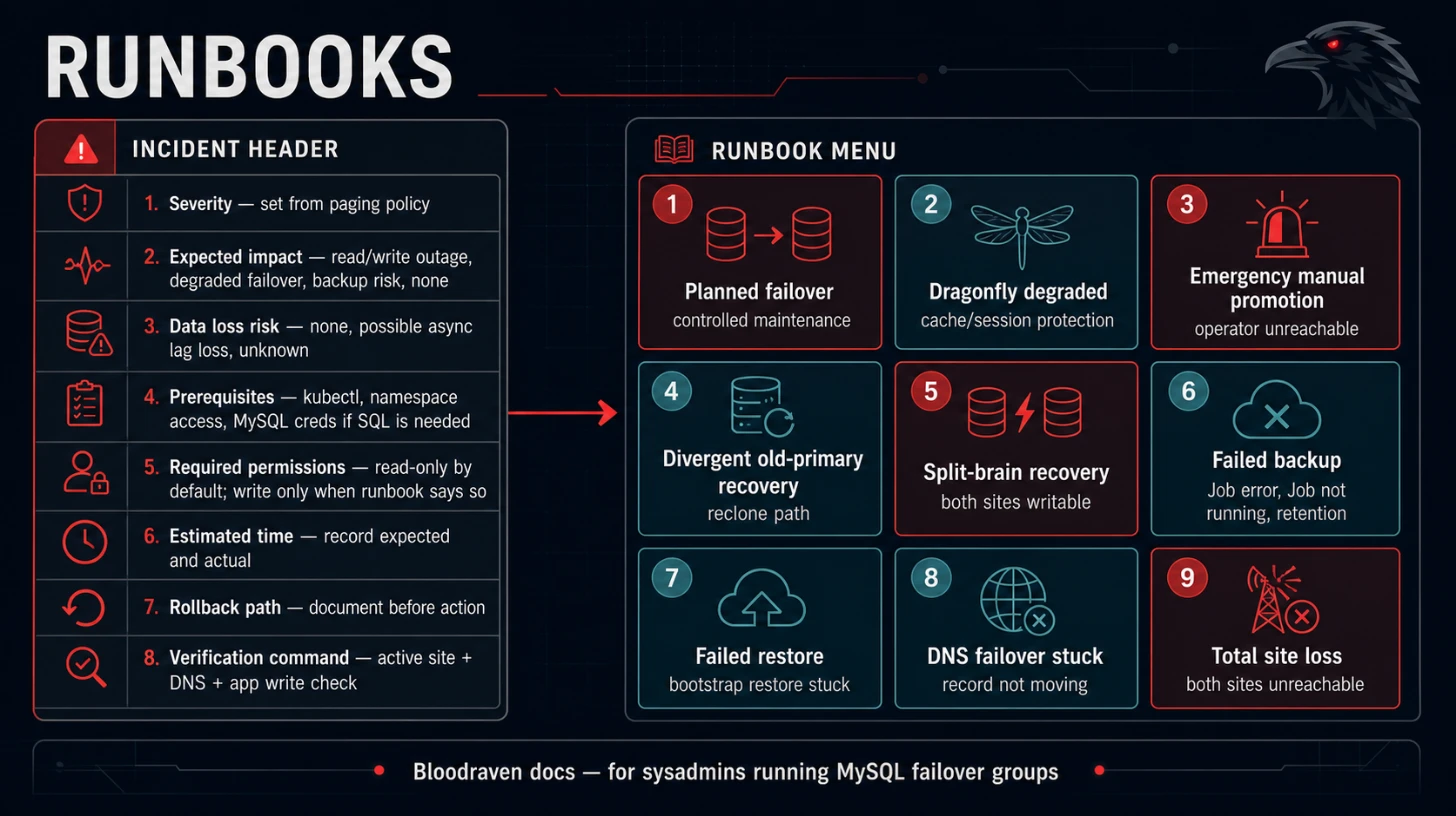
Every runbook starts with the same incident header. Fill it in before making changes.
| Field | Value |
|---|---|
| Severity | Set from paging policy |
| Expected impact | Read/write outage, degraded failover, backup risk, or no user impact |
| Data loss risk | None, possible async lag loss, or unknown |
| Prerequisites | kubectl, namespace access, MySQL credentials if SQL is needed |
| Required permissions | Read CRs/Events/logs; write CR annotations only when runbook says so |
| Estimated time | Record expected and actual time |
| Rollback path | Document before action |
| Verification command | Always include active site, DNS, and app write check when relevant |
If spec.dragonfly.enabled=true, include status.dragonfly.phase, active Dragonfly Service endpoints, and a Redis-compatible cache/session read/write check in the same incident record.
Planned failover
Use Planned Failover for controlled maintenance. Do not use during split-brain or when the target replica is unhealthy.
kubectl annotate mysqlfailovergroup orders -n orders \
  bloodraven.shipstream.io/planned-failover=pdx --overwrite
kubectl get mysqlfailovergroup orders -n orders -o wide
Verify DNS and application writes before starting maintenance on the old active site.
If Dragonfly is enabled, also verify status.plannedFailover.dragonfly.sessionsPreserved and confirm the active Dragonfly Service points at the new site.
kubectl get mysqlfailovergroup orders -n orders \
  -o jsonpath='{.status.plannedFailover.dragonfly}{"\n"}'
kubectl get endpoints orders-dragonfly -n orders
Dragonfly degraded
Use when status.dragonfly.phase=Degraded, bloodraven_dragonfly_site_up==0, or Dragonfly promotion failed. MySQL is still authoritative; this runbook protects cache/session continuity.
- Confirm MySQL
status.activeSiteand application writes are healthy. - Inspect
status.dragonfly.sites[]for unreachable, stale-master, syncing, or link-down sites. - Check the active Dragonfly Service endpoints and pod role/traffic labels.
- Restart or reschedule only the affected Dragonfly pod if the stale site has not accepted writes.
- If a stale master may have accepted writes, keep it out of the active Service and decide whether cache/session data can be discarded.
kubectl get mysqlfailovergroup orders -n orders \
  -o jsonpath='{.status.dragonfly}{"\n"}'
kubectl get pod -n orders -l app.kubernetes.io/name=dragonfly --show-labels
kubectl get endpoints orders-dragonfly -n orders
Emergency manual promotion
Use only when automation cannot complete and you have confirmed the old primary cannot accept writes.
- Preserve Events and logs.
- Confirm old primary is unreachable or fenced.
- Confirm candidate has the best GTID/replication position available.
- Promote using your approved MySQL operational procedure.
- Update or unblock Bloodraven reconciliation only after state is consistent.
Verification:
kubectl get mysqlfailovergroup orders -n orders -o yaml
dig orders.az.example.com
Split-brain recovery
Use when more than one site can accept writes.
- Stop application writes if possible.
- Identify all writable sites.
- Choose the authoritative site using business ownership and GTID evidence.
- Fence losing sites by ensuring
super_read_only=ONand blocking application traffic. - Preserve divergent data for manual reconciliation.
- Reclone losing sites only after data owners approve.
Do not skip GTIDs to make replication look green.
Divergent old primary recovery
Use when the old primary contains transactions absent from the promoted site.
- Export evidence from the old primary.
- Ask the data owner whether divergent rows must be recovered manually.
- Keep the old primary fenced.
- Reclone from the active primary when approved.
- Verify replication returns to healthy.
kubectl describe mysqlfailovergroup orders -n orders
kubectl get events -n orders --sort-by=.lastTimestamp | grep -i divergent
PVC loss recovery
Use when a MySQL data PVC is deleted or corrupted.
- Confirm whether the affected site is active.
- If active, stop application writes and follow emergency recovery policy.
- If standby, reclone from the active primary.
- If both sites are lost, restore from backup.
See Backup And Restore for restore workflows.
Total site loss
Use when all nodes/storage/network for a site are gone.
- Confirm surviving site is writable and healthy.
- Confirm DNS points to the surviving site.
- Disable app scheduling to the lost site.
- Rebuild site infrastructure.
- Rejoin via clone or restore.
Expected impact is bounded by failover detection, relay-log drain, DNS TTL, and application reconnect behavior.
Network partition diagnosis
Use Network Partitions. Prioritize preventing two writable sites.
kubectl get mysqlfailovergroup orders -n orders -o yaml
kubectl get endpoints,networkpolicy -n orders
kubectl get events -n orders --sort-by=.lastTimestamp
Failed backup
- Keep the last successful backup.
- Inspect
MysqlBackupstatus and Job logs. - Fix credentials, storage, or MySQL source health.
- Trigger a manual backup.
- Verify the new backup.
kubectl get mysqlbackup -n orders
kubectl describe mysqlbackup -n orders <backup-name>
Failed restore
- Confirm this is a recovery environment or approved destructive action.
- Inspect restore Job logs.
- Validate source path and decryption Secret.
- Recreate the recovery failover group if bootstrap partially initialized MySQL.
Operator unavailable
Use Operator Availability. Sidecar self-fencing is part of the safety model; do not disable it during diagnosis.
kubectl rollout status deployment/bloodraven -n bloodraven
kubectl logs -n bloodraven deploy/bloodraven
kubectl get lease -A | grep bloodraven
DNS failover stuck
- Confirm
status.activeSitechanged. - Inspect
DNSEndpointand external-dns logs. - Confirm provider record and TTL.
- If applications still write old site, fence the old site and restart affected clients.
kubectl get dnsendpoint -A | grep orders
kubectl logs -n external-dns deploy/external-dns
dig orders.az.example.com