Troubleshooting
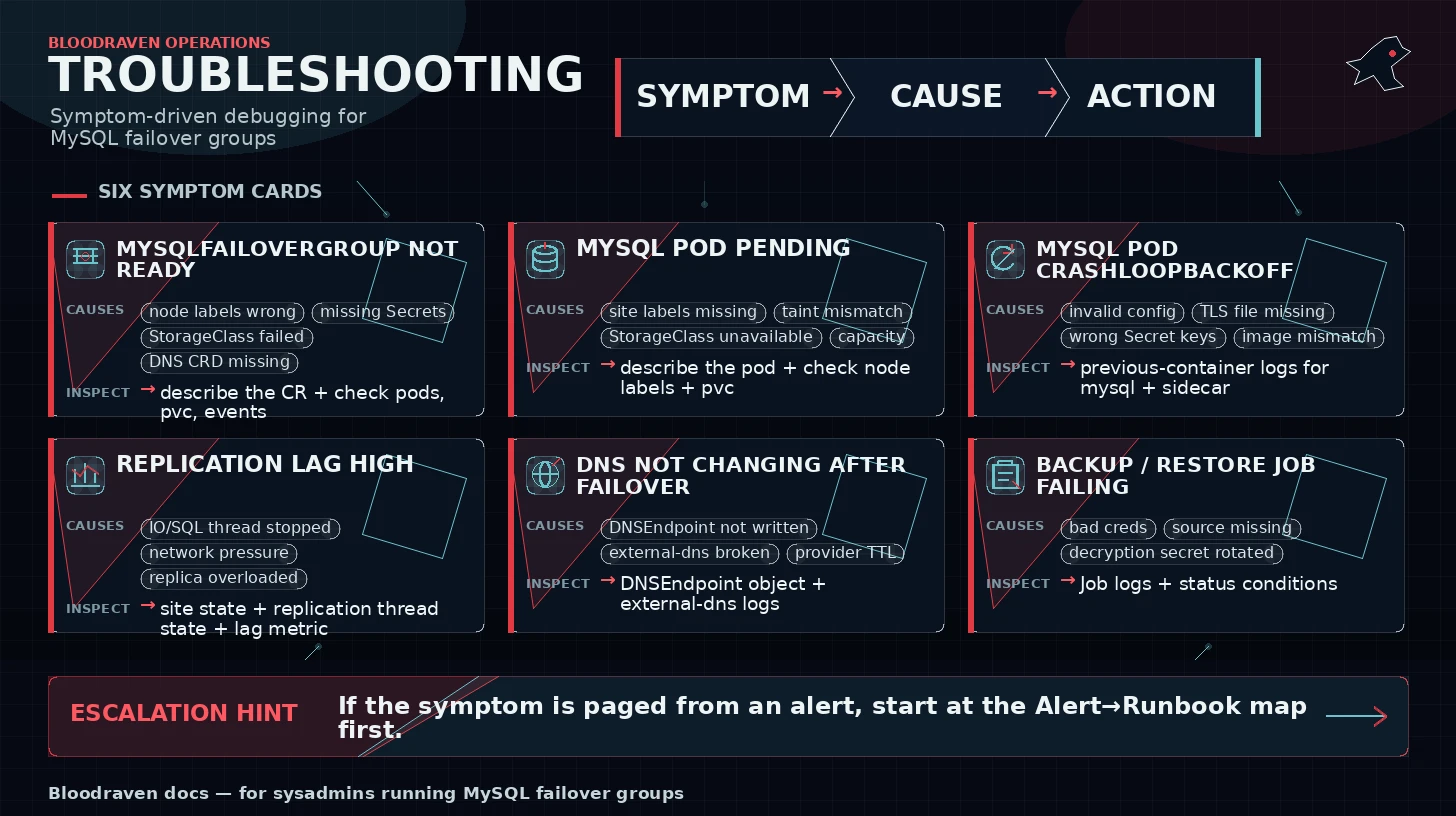
Use this page by symptom. If an alert fired, start with Alert To Runbook Map.
MysqlFailoverGroup not becoming Ready
Symptoms: Ready=False, Bootstrapping=True, MySQL pods exist but the group never settles.
Likely causes: node labels do not match taintNodeSelector, missing Secrets, StorageClass failure, failed clone, DNS CRD missing.
Inspect:
kubectl describe mysqlfailovergroup orders -n orders
kubectl get pods,pvc,events -n orders --sort-by=.lastTimestamp
kubectl logs -n bloodraven deploy/bloodraven
Safe remediation: fix the missing dependency first, then let reconciliation continue. Do not delete PVCs unless this is a disposable bootstrap.
See also: Getting Started, Placement Contract, CRD Reference.
MySQL pod stuck Pending
Symptoms: MySQL pod has no node, PVC unbound, or scheduler reports no matching nodes.
Likely causes: missing site labels, taints/tolerations mismatch, unavailable StorageClass, insufficient CPU or memory.
Inspect:
kubectl describe pod -n orders -l app.kubernetes.io/instance=orders
kubectl get nodes --show-labels
kubectl get pvc -n orders
Safe remediation: add required node labels, fix StorageClass, or lower resource requests after confirming capacity.
See also: Placement Contract.
MySQL pod CrashLoopBackOff
Symptoms: pod restarts repeatedly; MySQL or sidecar logs show bootstrap, TLS, or credential errors.
Likely causes: invalid MySQL config, missing TLS files, wrong Secret keys, incompatible image, failed clone restart.
Inspect:
kubectl logs -n orders pod/<mysql-pod> -c mysql --previous
kubectl logs -n orders pod/<mysql-pod> -c bloodraven-sidecar --previous
kubectl describe pod -n orders <mysql-pod>
Safe remediation: restore the last known-good image/config or fix the Secret/TLS reference. If clone completed and MySQL exited for a container restart, Kubernetes may recover it automatically.
See also: Credentials And TLS, Failure Mode Matrix.
Site marked unreachable
Symptoms: status.sites[].reachable=false, failover may start after threshold.
Likely causes: MySQL down, network policy block, node outage, Service endpoint missing, TLS or credential failure.
Inspect:
kubectl get mysqlfailovergroup orders -n orders -o yaml
kubectl get endpoints -n orders
kubectl get networkpolicy -n orders
Safe remediation: restore connectivity or let failover complete. Avoid manual promotion until you know which site accepted the last writes.
See also: Failover, Network Partitions.
DNS not changing after failover
Symptoms: status.activeSite changed but orders.az.example.com still resolves to the old IP.
Likely causes: DNSEndpoint CRD missing, external-dns not watching the namespace, provider credentials failure, TTL/cache delay.
Inspect:
kubectl get dnsendpoint -A | grep orders
kubectl logs -n external-dns deploy/external-dns
dig orders.az.example.com
Safe remediation: fix external-dns and wait for TTL expiry. If apps are writing to the old site, prioritize fencing and app routing.
See also: Runbooks, App Integration.
Dragonfly degraded or active Service empty
Symptoms: status.dragonfly.phase=Degraded, bloodraven_dragonfly_site_up==0, orders-dragonfly has no endpoints, or Events mention DragonflyPromotionFailed.
Likely causes: Dragonfly pod down, NetworkPolicy blocking port 6379 or admin port 9999, auth Secret mismatch, target replica syncing/loading, stale master kept out of the active Service, or snapshot restore in progress.
Inspect:
kubectl get mysqlfailovergroup orders -n orders \
  -o jsonpath='{.status.dragonfly}{"\n"}'
kubectl get pod -n orders -l app.kubernetes.io/name=dragonfly --show-labels
kubectl get endpoints orders-dragonfly -n orders
kubectl get events -n orders --sort-by=.lastTimestamp | grep -i dragonfly
Safe remediation: restore the failed Dragonfly pod or network path first. Do not force a stale master back into the active Service unless you have decided its cache/session contents are authoritative. MySQL remains authoritative for durable data.
See also: Runbooks, App Integration, Monitoring.
App still writing to old site
Symptoms: application errors or writes appear on the old primary after failover.
Likely causes: DNS cache too long, connection pool did not reconnect, app pinned a site Service, old site not fenced.
Inspect:
kubectl get mysqlfailovergroup orders -n orders -o jsonpath='{.status.activeSite}{"\n"}'
dig orders.az.example.com
kubectl get pods -n orders -o wide
Safe remediation: restart or drain affected app pods, lower DNS/client cache TTL, confirm old site is read-only.
See also: App Integration, Network Partitions.
Replication lag high
Symptoms: secondsBehindSource exceeds policy, alerts fire, replica may not be chosen for backups.
Likely causes: under-sized replica, slow network/storage, long transaction, backup load, SQL thread stopped.
Inspect:
kubectl get mysqlfailovergroup orders -n orders -o yaml
kubectl exec -n orders <replica-pod> -c mysql -- mysql -e 'SHOW REPLICA STATUS\G'
Safe remediation: reduce write load, investigate storage/network, restart replication only after recording the error.
See also: Monitoring, Durability And RPO.
Replication stopped
Symptoms: replica IO or SQL thread down, replicating=false.
Likely causes: credential drift, network failure, missing binlog, divergent transaction, MySQL error.
Inspect:
kubectl exec -n orders <replica-pod> -c mysql -- mysql -e 'SHOW REPLICA STATUS\G'
kubectl describe mysqlfailovergroup orders -n orders
Safe remediation: fix the underlying error. If GTIDs diverged, use the divergent old primary recovery runbook rather than skipping transactions.
See also: Runbooks.
Divergent transactions detected
Symptoms: old primary cannot rejoin; Events or logs mention divergent GTIDs.
Likely causes: old primary accepted writes that never reached the promoted site.
Inspect:
kubectl describe mysqlfailovergroup orders -n orders
kubectl get events -n orders --sort-by=.lastTimestamp | grep -i divergent
Safe remediation: preserve evidence, decide whether to extract missing data manually, then reclone the divergent site from the active primary.
See also: Runbooks, Durability And RPO.
Backup Job failing
Symptoms: MysqlBackup.status.phase=Failed, backup Job failed.
Likely causes: S3 credentials, bucket policy, PVC full, MySQL credentials, staging volume eviction, source replica lag.
Inspect:
kubectl describe mysqlbackup -n orders <backup-name>
kubectl logs -n orders job/<backup-job-name>
kubectl get events -n orders --sort-by=.lastTimestamp
Safe remediation: fix credentials/storage first, then create a new manual backup. Do not lower retention until at least one newer backup succeeds.
See also: S3 Backups, PVC Backups.
Restore Job failing
Symptoms: restore status is failed, restore Job exits non-zero.
Likely causes: wrong artifact path, missing decryption passphrase, S3/PVC access, incompatible MySQL shell/server version.
Inspect:
kubectl describe mysqlfailovergroup orders-restore -n orders
kubectl logs -n orders job/<restore-job-name>
kubectl get pods,pvc -n orders
Safe remediation: verify source artifact and credentials, then recreate the recovery group if bootstrap state is partial. Preserve failed restore logs.
See also: Backup And Restore, Backup Encryption.
Grafana dashboards show no data
Symptoms: dashboards import but panels are empty.
Likely causes: Prometheus is not scraping Bloodraven, wrong datasource variable, dashboard ConfigMaps in an unwatched namespace.
Inspect:
kubectl get servicemonitor -n bloodraven
kubectl port-forward -n bloodraven deploy/bloodraven 8080:8080
curl http://localhost:8080/metrics | grep '^bloodraven_'
Safe remediation: fix scraping first, then dashboard datasource selection.
See also: Prometheus Setup, Grafana Dashboards.
Operator logs show permission denied
Symptoms: reconcile errors mention forbidden Kubernetes API operations.
Likely causes: RBAC drift, namespace-scoped install missing permissions, Helm chart RBAC not updated with generated RBAC.
Inspect:
kubectl auth can-i list mysqlfailovergroups.shipstream.io --as=system:serviceaccount:bloodraven:bloodraven
kubectl describe clusterrole bloodraven
kubectl logs -n bloodraven deploy/bloodraven
Safe remediation: restore chart RBAC from the current release. Do not grant wildcard permissions unless your platform policy explicitly accepts it.
See also: Security Model, Production Install.